


What is B2D Sales?
B2D, or Business-to-Developer, is a model that has picked up traction in the last few years that recognizes the importance of developers as influential users and caters to their specific needs. Unlike B2B or B2C business models, where visitors or prospects interacting with marketing resources get labeled as leads and nudged along the buyer funnel, developers are notoriously averse to the usual marketing or sales tactics.
So, they might not engage with your whitepapers, but they might be checking out your docs, signing up for free trials, copying CLI commands, hanging out in developer communities. Since most of these actions are taken anonymously, you can’t really act on those ‘dark funnel’ signals, which means you are left taking shots in the dark.
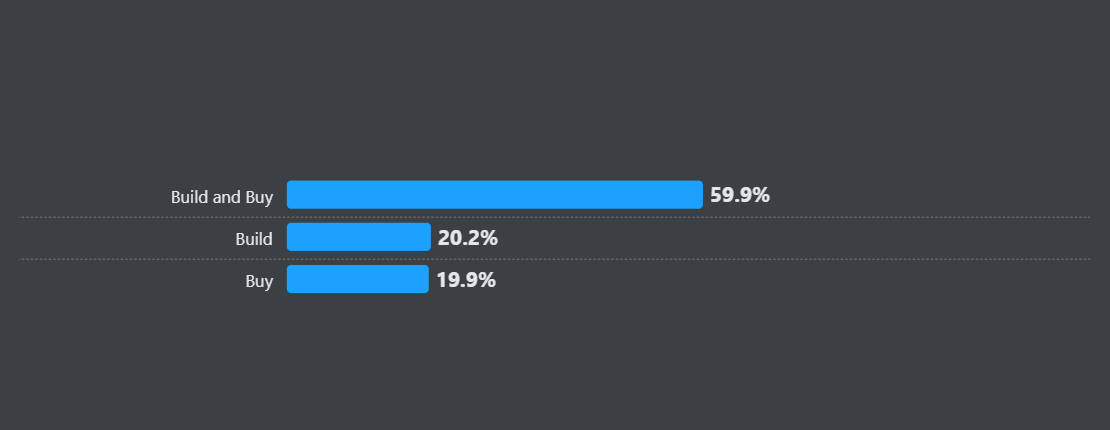
Developers are builders by nature, so if they face a problem, they would much rather build a solution and see if it makes sense to buy it down the line, as is evident from the 2024 Stack Overflow Developer Survey.
Additionally, just because you have a developer in your ecosystem, it doesn’t mean they might buy your product. For more developer tools, you end up dealing with two different personas: a developer and a buyer. Developers don’t want to be sold to, but they’d still like prompt support and technical help when they ask for it. They might have limited budgets, but they have a strong influence over the purchase process. The buyer, usually a member of the C-suite or a department head, will usually be more open to a sales conversation, but even if you do get their ear, they’ll still delegate the qualification process to the developers before making a decision.
This unique hybrid setup warrants a new process to sell to developers, one that’s more technical, sheds more light on anonymous developer activities, and identifies the buyers at the right time without hampering the self-discovery process of the developers. The traditional B2B and B2C sales playbooks tend to have gaps that can’t fulfill this requirement, so for B2D sales, we’ll pick up a new approach.
Understanding the B2D Sales Landscape
According to the Mordor Intelligence report, the software development tools market is valued at $6.41B in 2025, and is expected to grow to $13.7B by 2030. Since moving your company to a public cloud can lead to a ~40% reduction in total cost of ownership (TCO), companies are further incentivized to move to the cloud, which further makes it easier for companies to build and adopt developer tools at scale.
Almost 62% of developers said they had some influence over new technology purchases at their organization, which marks a shift to a more bottom-up-led sales motion.
So, it’s pretty evident that the developer tooling space is exploding with the developers holding an important seat at the table. But this is where the developer tooling space gets vastly more complex.
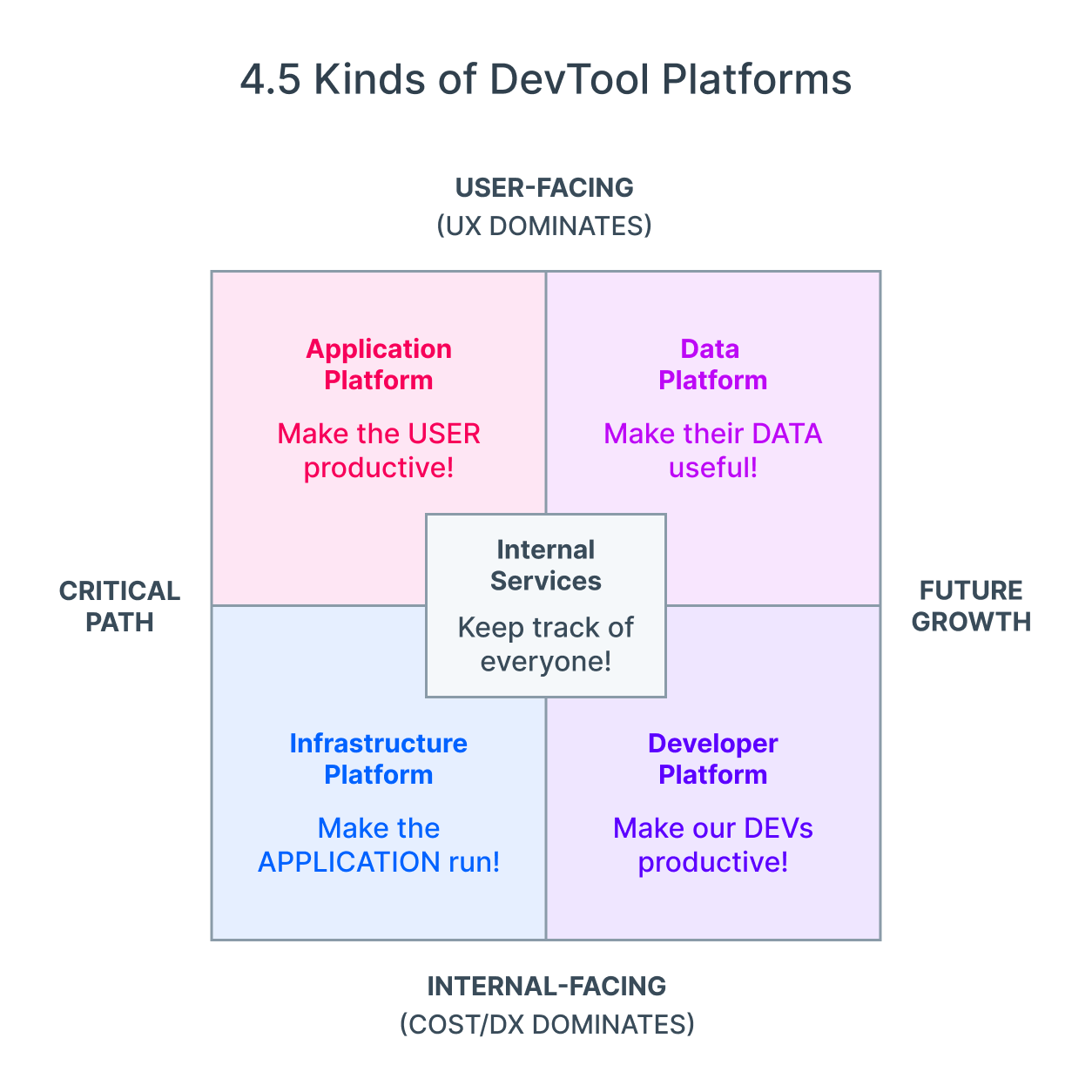
Let’s start with the classification of developer tools. Swyx went into considerable detail about how the existing models, like the SDLC approach, infra approach, and data-centric approaches, end up missing out on a key piece of the pie, so to simplify the landscape, here are 4.5 kinds of developer tooling platforms in the market today:
Now, after you’ve correctly classified your product, you’ll need to map out your user/buyer personas. If we’re just looking at user personas, you’ve got your automation engineers, network engineers, front-end developers, data engineers, DevOps engineers, security engineers, and application developers, to name a few.
All these different personas tend to operate at different levels of the usual tech stack.
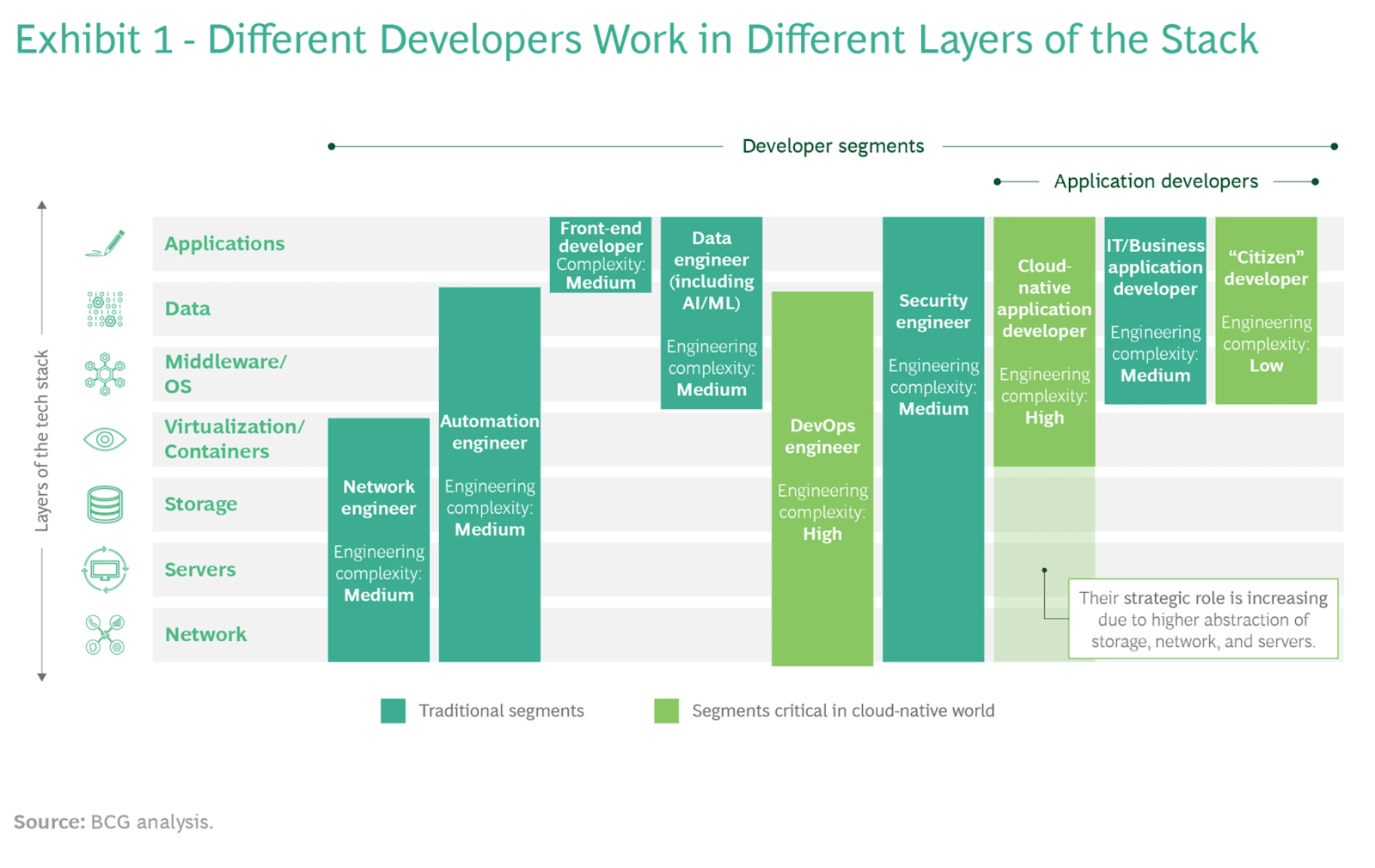
Because they operate at different levels of the tech stack, they tend to have different areas of focus and needs. At the same time, their needs aren’t static either.
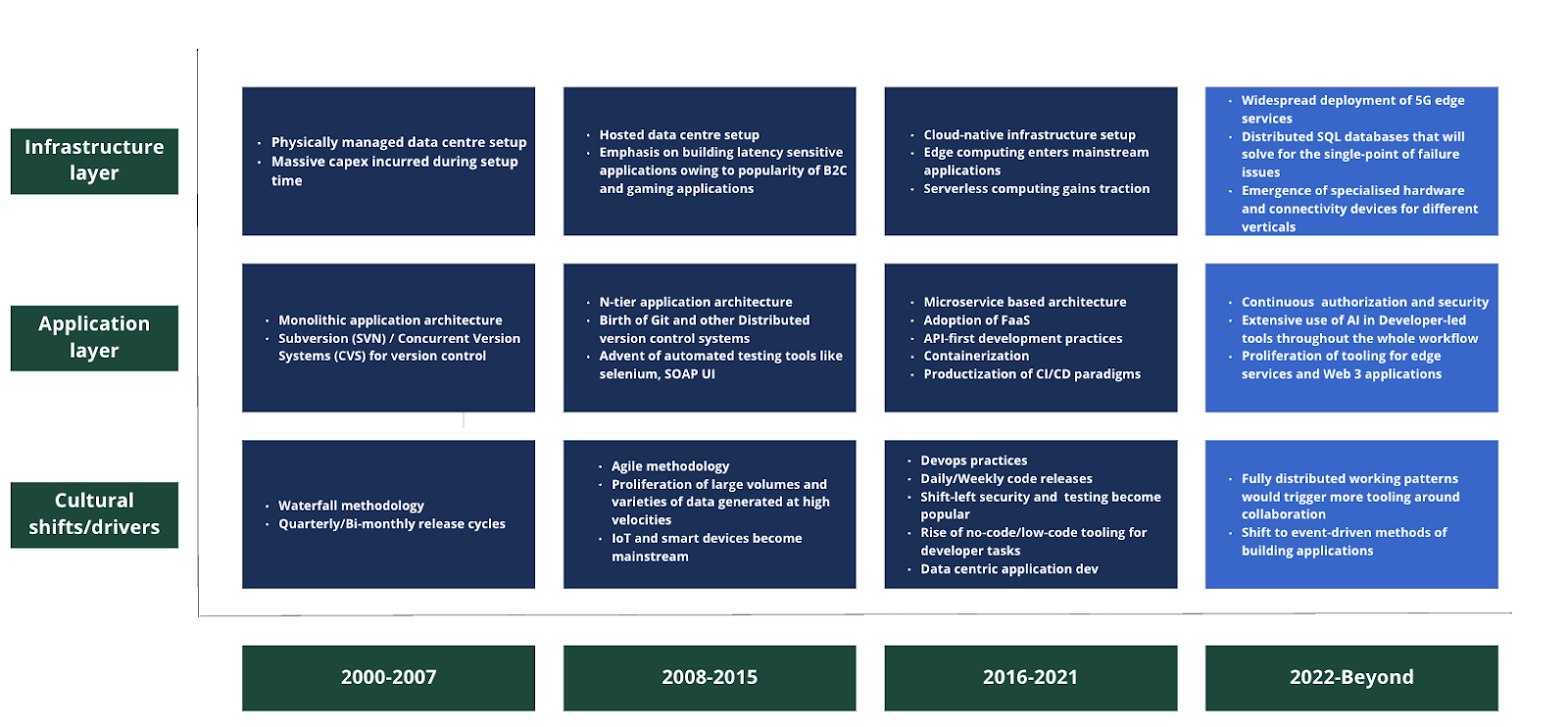
According to this image by Blume VC, you can see how the tooling has evolved over the years based on the key cultural shifts/drivers.
So, this means in order to cater to the needs of the developers, you don’t just need to have a keen understanding of the type of developer who’d be interested in using your product, their specific needs and problems, but also keep up with the industry needs. And that’s just the user layer. Since developer tools tend to have a whole other buyer persona, you need to see how different C-suite members might influence the purchase process as well. Add to that a non-linear, collaborative process of developer evaluation, and you can see why most developer tools get stuck trying to sell their tools.
Before we shed more light on the buyer journey, sales process, personas, and strategies, it’s important that you get rid of the most common misconceptions plaguing this space. That way, you’ll pick up the information in the following sections as we intended: with an open mind. So, here are the 4 common misconceptions about B2D sales that you need to purge right now:
- “Developers hate being sold to”: Partly true. Developers hate aggressive qualification and irrelevant outreach. The sales function needs to approach developers with the goal of supporting them in succeeding with their product, instead of trying to “sell” them on the benefits of the paid version.
- “You don’t need sales if your product is good enough”: There’s a whole bunch of developer tools like Snyk that have realized their buyer and the user weren’t the same person. So, no matter how successful the PLG/community-driven/self-serve motion might be for garnering developer adoption, you do need some sort of sales, customer success, and solution engineering team if you plan on scaling.
- “Free users won’t convert in dev tools”: Free users are absolutely pivotal to help you land your paid customers, just not in the way you would normally assume. Conversion usually happens at the team level, where the free users play a key role in getting their team members to try out the product. Team-level adoption eventually makes way for organization-level adoption, as part of the most common developer tooling expansion strategy: land-and-expand.
- “You should segment ICP by industry, similar to SaaS”: Since there are two personas we are dealing with in the sales of developer tools, there are two ICP definitions that need to be kept in mind. We can’t really do that by following the traditional SaaS model, which means we’ll need to come up with new ICP definitions for B2D sales. Second, the definition of an ICP (person or company) has traditionally been built on demographic and firmographic data, as opposed to other filters that actually signal buying interest. For developer tools, we need to rely on technographic signals a lot more, while using firmographic and demographic signals to refine our ICP definitions built on key technographic signals as the base.
The B2D Buyer Journey and Sales Process
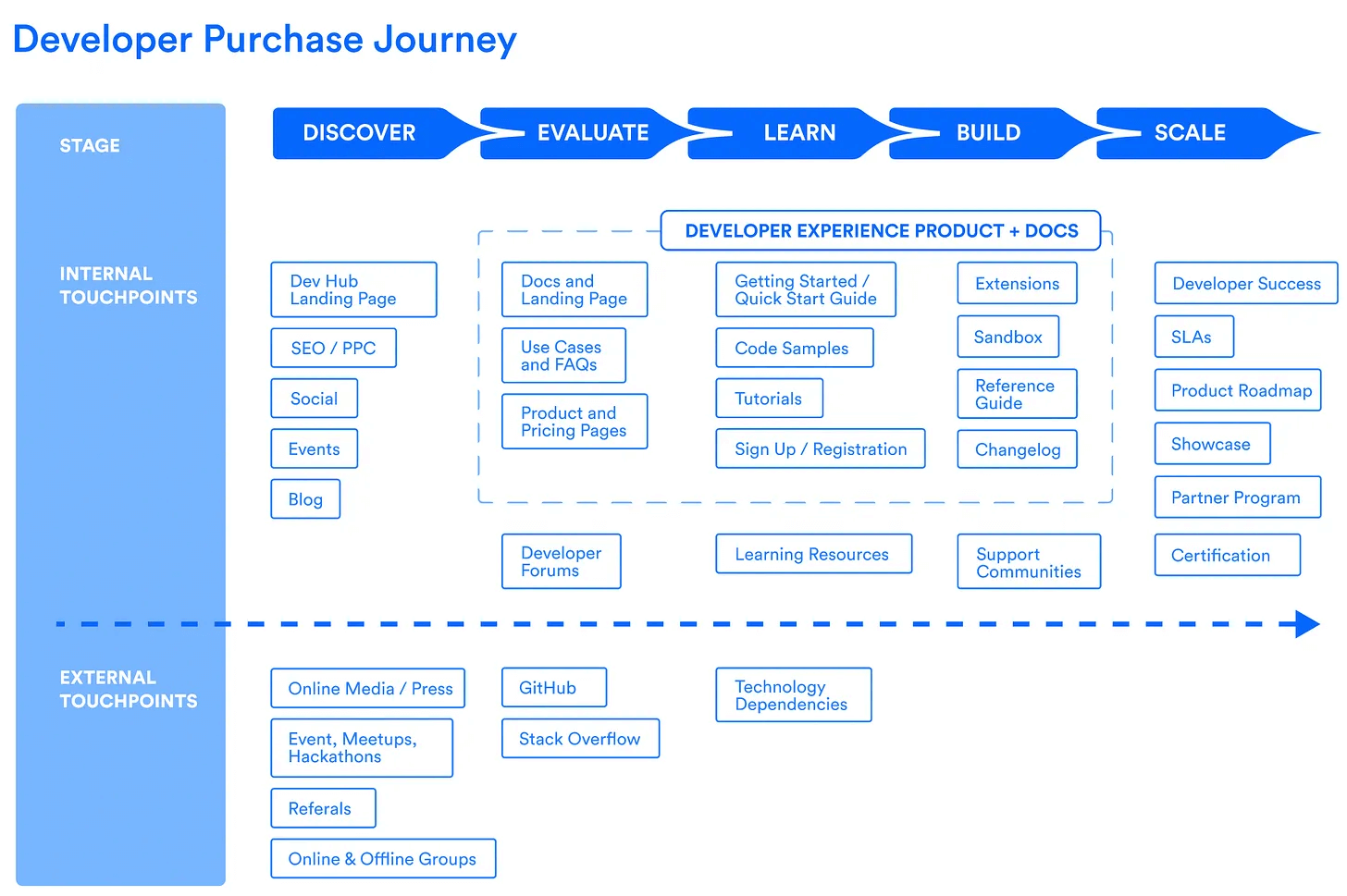
As is evident from the image, we can break down the developer purchase journey into 5 key categories: Discover, Evaluate, Learn, Build, and Scale.
Discover
The starting point for a developer’s purchase journey usually starts with a problem that they want to solve. In this phase, the developer will learn about your product either through word-of-mouth, search, or other channels. Having come across your product, they’ll start learning about it and the problems your product solves.
Evaluate
If you get the initial stamp of approval from the developer, they’ll start evaluating your product. In this phase, the developer is trying to understand if your tool actually meets their organization’s needs. This means getting a deep understanding of its strengths and weaknesses, supported integrations, and pricing models.
If the developer feels that you fulfill all the criteria on their “mental checklist”, you’ll become a serious contender for their tool stack.
Learn
After the evaluation phase, developers will start consuming relevant resources to help them understand how your product works. Usually, developers will rely on your documentation, tutorials, and getting started guides, but if your product or industry is a category creator, you might have to prepare technical deep dives, conduct knowledge transfer workshops, or set aside office hours to help them through common stumbling blocks.
Developers like to learn about a new product by building something with it, so if your product has a lot of checks and balances in place, consider offering easy-to-use playground environments or Quickstart examples.
According to Haley Massa, you can gently start sprinkling the value of your product in developer conversations in this stage through:
- Value checklists: Your quickstart examples and playground environments should explicitly highlight the value your product can add to the developers’ workflow. If you can get them to tell you about what they hope to achieve with the product, you can align on the expected value they can get out of the product to ensure they have a smooth learning phase.
- Touchpoints + Feedback: If your documentation and guided examples do their designated jobs, your developers should be able to find out about your product’s value by themselves. But if you can come up with a recommended learning plan and touchpoints for structured feedback, you’ll have a clear view of your successful and unsuccessful learning phases. This is valuable feedback for the product and engineering team to help them ensure a smoother user journey and build POCs with shorter time-to-value.
Build
Once the developers have built a few “Hello World” projects, they’ll start building a Proof of Concept (POC) for their use case.
In this phase, your buyers might also become aware of the problem, which means they might be open to getting on sales discovery calls with you. However, the buyer might just pass the tool back to the developer for their recommendation, so your role at this stage of the buyer journey is still one that actively provides support. There are 2 key ways for you to help them get to value with their POCs as fast as possible in this stage:
- Help them pick the right POC use case: Usually, teams know what their first MVP will focus on, but if there’s a bunch of different options to choose from, you can offer “MVP discussions” to help them pick out the right option. Developers might want to take on the most ambitious challenge with your product, but if it takes too long to build, you might end up with disinterested developers at the end of it. So, the best way to approach these discussions is to find a POC use case that highlights significant value to both the developers and the business stakeholders while ensuring the shortest time-to-value possible.
- Provide adequate support in the event of a breakdown: While building a POC, things might break down, so support is another key aspect that gets tested in this phase. Ideally, your product team would want the journey to be entirely self-serve, but if something does break down, your team should have dedicated resources to patch things up for your prospects.
Scale
Once your free/open-source/freemium product gets the green light from the developers, you might see increased developer adoption and a spike in the cumulative time spent by them around your product ecosystem.
This is the right time to reach out to the buyer and build a business case with them. At the same time, you allow developers to keep moving through your PLG funnel, providing them with the necessary resources, like timely check-ins to grow with you. These developers would also be more than willing to provide feedback on the product roadmap, allowing your product/engineering teams to chart a smoother buyer journey.
The developer tools that have scaled well tend to focus on developer/customer success functions to keep nurturing strong customer partnerships/relationships.
Beyond this phase, the sales team will engage with the buyer to get them to sign on the dotted line for a larger team or organization-wide adoption or a longer contract.
Advocacy
This is a unique stage that can be considered as the last touchpoint for a developer tool buying journey. In this phase, you turn a traditional customer into a partner or public champion of your product. These champions won’t just engage with your product, but also contribute to open-source discussions, spread the word about the product in their communities/circles, or even write plugins and extensions to help improve your product.
Not only is this stage an important measure of your customer retention rates, but nurturing these champions also opens up a new channel to drive product sales.
Key takeaway for dev sales teams: The best time to get your sales team in the picture is when the developer has started building a POC for their use case, and the buyer has become aware of the problem.
Key Stakeholders in B2D Sales
A common observation for B2D sales folks is that there are usually a lot of personas in play with varying levels of influence over adoption and purchase decisions. The best way to wrap our heads around all the different stakeholders is through a “Decision-Making Unit” (DMU). Based on the context of your tool and the structure of typical organizations, here’s how a DMU might be structured:
- End Users: Developers and engineers in an individual contributor role are usually the first ones to feel the pain, and they are the ones responsible for starting the entire purchase journey by raising awareness internally. They might also be the first in line to run the trials and build the POCs.
- Technical Decision Makers: This group is responsible for determining whether a tool should be a part of their tech stack, checking things like the integration viability, security stance, maintenance requirements, and architectural compatibility. Based on the technical tradeoffs, they’ll decide if the tool should be limited to a one-time experiment for a singular team or rolled out across the organization. You’ll usually find tech leads, senior developers, and architects occupying this role.
- Economic Buyers: The CTOs, Directors, and VPs of Engineering have final say over the budget and long-term direction. Their evaluation focuses on productivity gains, total cost of ownership, strategic alignment, and team velocity.
- Governance Stakeholders: You’ve got your legal, security, compliance, and procurement teams as the governance stakeholders of an organization who are responsible for SSO, SOC2, DPAs, vendor insurance, rate-limit guarantees, and contract risk. For enterprise tools, this group can single-handedly block the deal if your tool doesn’t meet the necessary requirements.
- Cross-Functional Engineers: Finally, we have the ‘influencer’ group. These tend to be adjacent teams who can shape perception from the shadows. They might not have the final say in the purchase of a tool, but their opinion does carry a lot of weight in whether a tool gets adopted across teams. This includes input from the SRE, platform, data engineering, and QA teams.
Usually, for a traditional enterprise buying group, you can identify the key behavioral characteristics of each group, which allows you to better handle conversations with them. According to CEB’s research, there are 7 types of customer stakeholders:
- The Go-Getter: Excited about change, and might take care of the internal selling of your product.
- The Skeptic: Approaches change cautiously and analytically. They are usually open to new ideas, but need hard proof before bringing it to their team.
- The Friend: As the name suggests, this person is willing to meet, discuss ideas, make introductions within the team, and provide salespeople with any insights they might need.
- The Teacher: Highly trusted visionaries who like to bring new ideas into the company.
- The Climber: This is a person more interested in personal gain, which means they’ll be on board if a change allows them to move up the corporate ladder.
- The Guide: Gives you valuable information that might be typically unavailable to suppliers.
- The Blocker: They like the status quo, which means they are highly likely to block new ideas.
Among the people who might be valuable to you, you’ve got mobilizers (the go-getters, skeptics, and teachers) who’ll act as your internal champions and the talkers (The friends and guides) who might be open to talk, but aren’t really all that inclined to take action on your behalf.
Usually, for enterprise sales, you’ll find that the different groups can neatly fit into each of these stakeholder categories. That’s not the case for developers. They might transition across categories as they get more familiar with your product, so it makes more sense to consider these types as “behavioral states” in B2D sales as opposed to fixed types. This is what that transition can look like as the developer moves along the self-serve journey:
Additionally, if we were to map these “behavioral states” to all the stakeholders in our DMUs, this is what it would look like:
B2D Sales Personas and Targeting
Developer Personas
Developers are the end-users of your product, but based on their job type, seniority, and team responsibilities, they might have different needs.
- Type: A frontend developer would care more about the tool’s UI toolchains, testing frameworks, and DX, while a backend developer might be more concerned about scalability, latency, and database integrations. A DevOps engineer would want to optimize for automation, security, deployment pipelines, and infrastructure at scale. What might be mission-critical for one type of developer might just be a good-to-have for another.
- Experience: Junior developers tend to drive awareness through experimentation, but rarely ever have the economic power to sign off on a tool for a team or organization. On the other hand, more senior developers or staff engineers tend to have a strong influence on tool selection, taking on the role of technical decision makers, as discussed in the previous section.
- Individual contributors vs team leads: Individual contributors are crucial for running POCs and determining product fit, but for a team-level rollout, you need to get the buy-in from the team leads.
Industry and Company Size Considerations
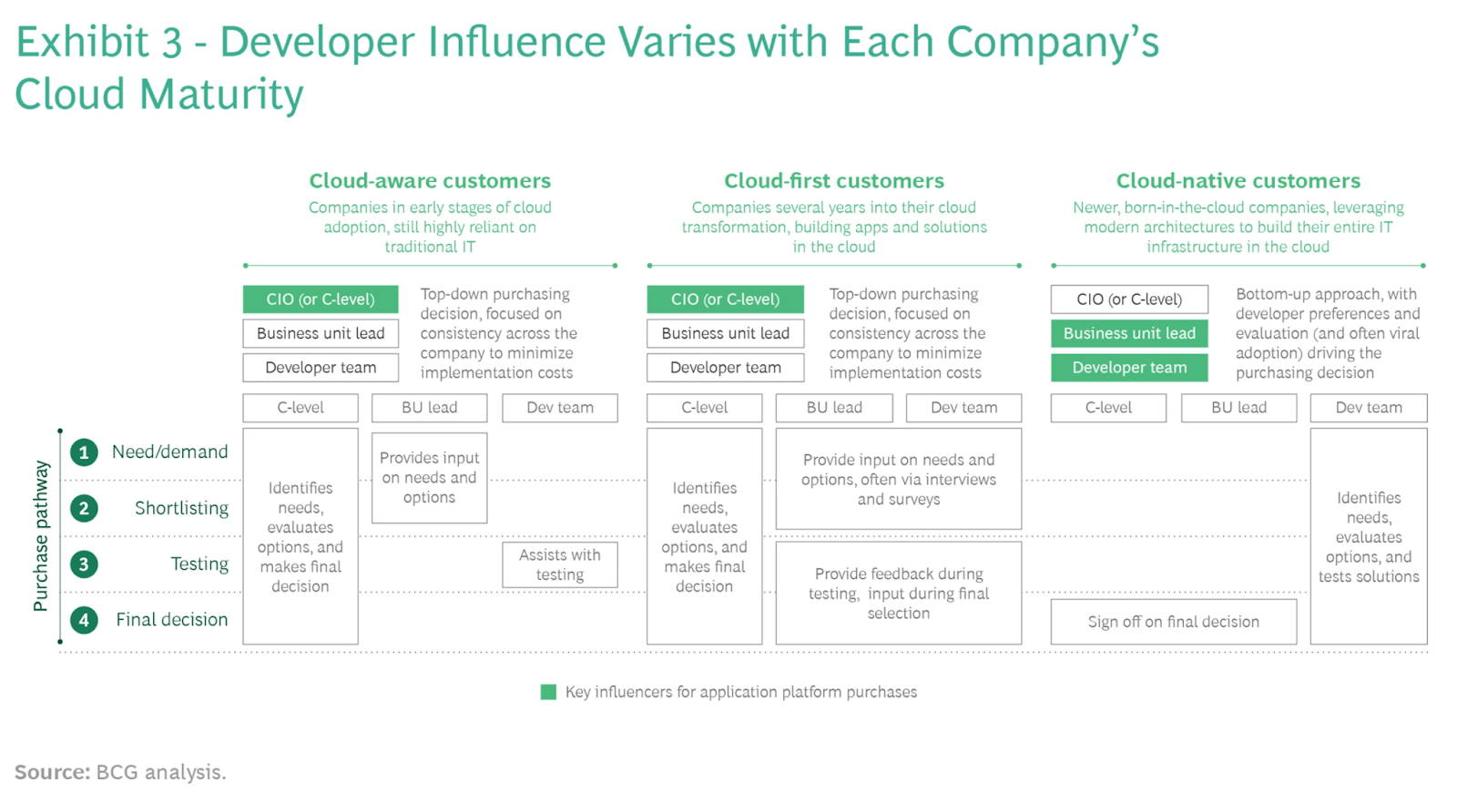
- Cloud maturity: Based on a company’s cloud maturity, you can usually classify a company into 3 categories: cloud-aware, cloud-first, and cloud-native. According to BCG’s research, the product adoption for cloud-native companies happens in a bottoms-up manner, with developer preferences and evaluation driving the purchase decision. On the other hand, for cloud-aware and cloud-first companies, the preferred sales approach might be a hybrid one where the C-level identifies needs and evaluates options, with the developer team providing key input that would influence the selection. You also might see a longer sales cycle with the latter, but the average contract value tends to be a lot higher here, too.
- Product category: If your product belongs to the observability, infrastructure, application platforms, AppSec/DevSecOps, Automation/CI/CD categories, DevOps engineers, platform teams, and cloud-native developers would have more influence over the purchase decision. On the other hand, if your tool is a low-code or no-code business app, legacy enterprise middleware, or a traditional security tool, the evaluation will be mostly carried out by the leadership and procurement teams.
- Industry-specific technical requirements: Different industries tend to have different blockers and deal accelerators. For instance, financial services and insurance tend to place a heavy emphasis on security and governance. The developer team might influence technical fit, but might not have as much say in the vendors that end up getting shortlisted. On the other hand, an industry like fintech tends to be highly cloud-native, and developers might have a bigger say in tool selection.
- Company size: For small startups, your end user might very well be your buyer, which means a simple PLG, self-serve model works just fine. You’ll also enjoy a faster sales cycle with no involvement of procurement teams to complete the purchase. On the other hand, for mid-market and enterprise companies, you’ll start to see that DMU emerge as the sales cycle gets longer.
Based on these criteria, you can use our segmentation framework to identify your developer tool’s target audience.
B2D Sales Methodologies and Frameworks
Based on the different GTM motions that a developer tool can follow, there are 4 key approaches for B2D sales.
Bottom-Up Sales Approach
The buying journey starts with the developer, not the buyer, which is typical for self-serve products that don’t need team buy-in to get started.
Developers tend to be builders first. But, if they don’t want to build it themselves, they’ll most probably sign up for free trials of relevant products or ask developers they trust to guide them to the right product.
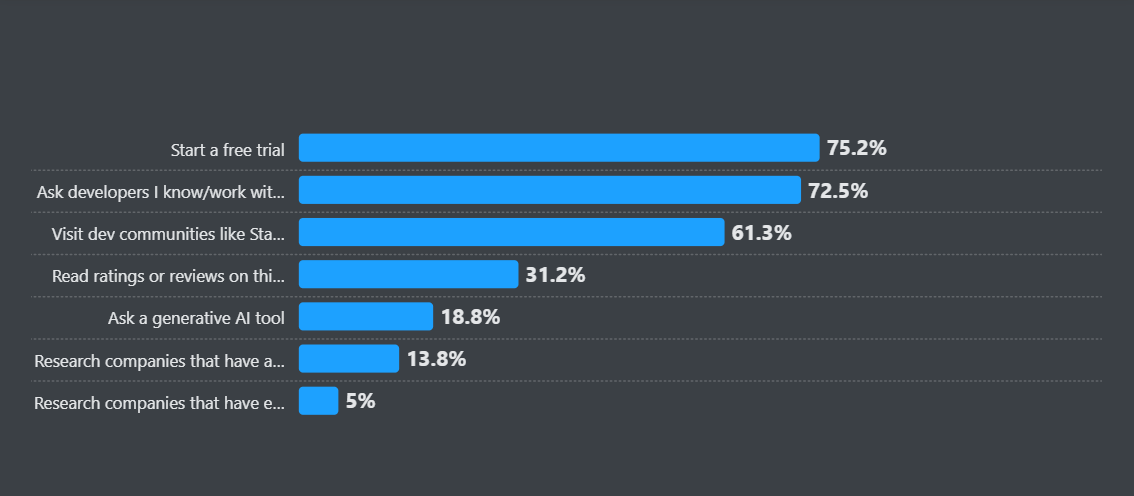
They would very much like their exploration process to be self-serve. If you drop in with sales calls or demo requests, you might risk losing them. At some point, they might hit usage or feature limits that prompt an upgrade. Usually, this process from discovery to tool purchase takes place without ever interacting with sales. The sales team can enter the picture when multiple developers from the same company start using the product, cause there’s an opportunity for a team-level scaling conversation to be had with the team leads. If all goes well, this can then evolve into an organization-wide tool adoption, and is best known as the land-and-expand model.
Community-Led/Open-Source Led Sales Approach
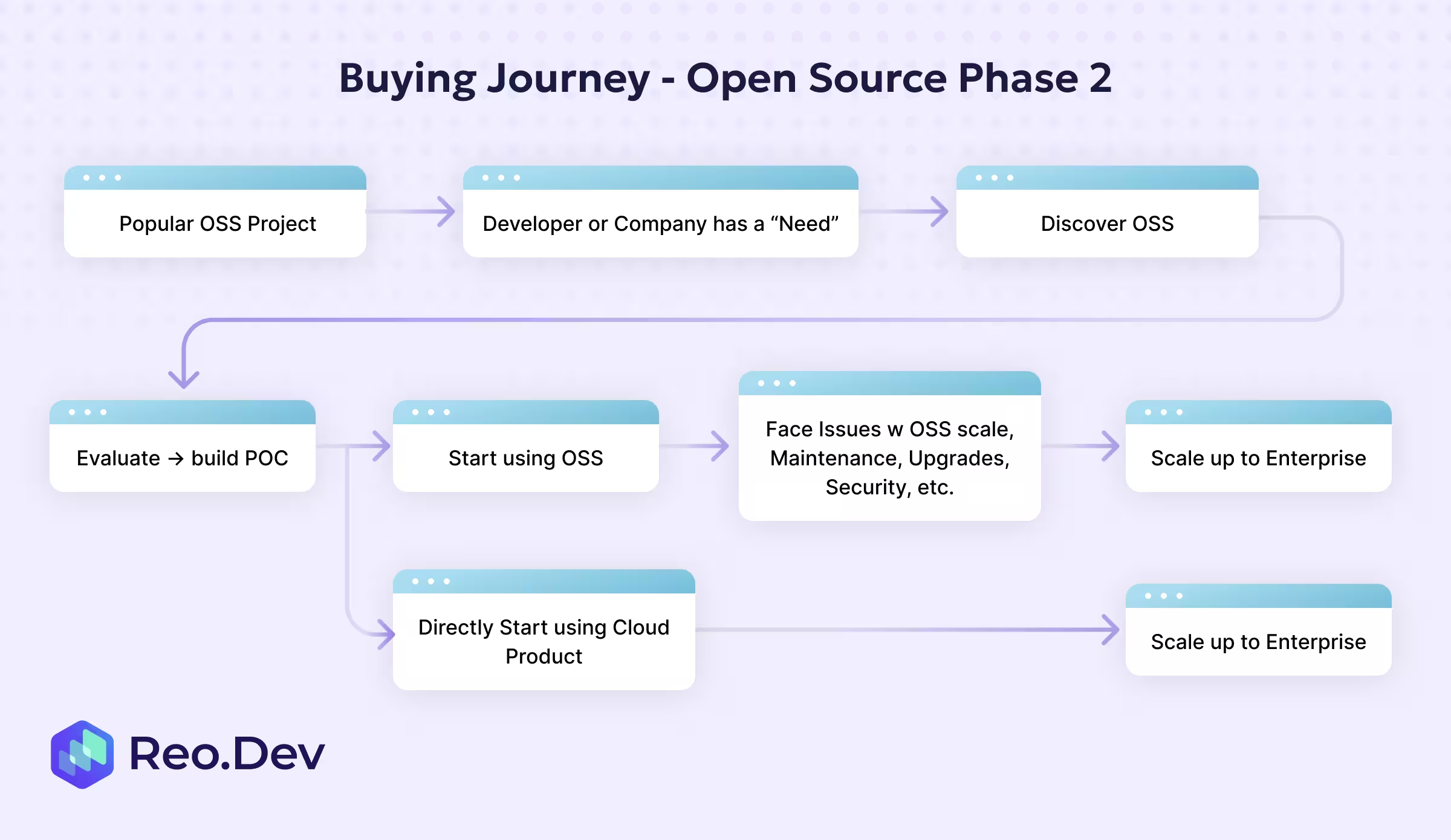
The developer journey starts when a developer discovers your open-source project either through GitHub, a blog post, or a friend’s recommendation. Before they start using it, the developer or team would assess if the tool fits their use case. Tech stack compatibility, presence of active maintainers, clear documentation, and nature of the repo (is it really open-source or are there some caveats?)
After their initial evaluation, they’ll build and test a small-scale implementation or POC by themselves. If the POC works, the team will adopt it in production. There’s still no need for a formal contract or support in their eyes.
Finally, as usage grows, they might feel the weight of the open-source project’s security vulnerabilities, scaling challenges, and maintenance overhead for teams, which is when they might start looking for a commercial offering. They might buy support contracts from the original maintainers or migrate to a hosted enterprise version that takes care of SLAs, monitoring, and security.
Here, as a part of the sales team, you can look out for signals of friction where an upgrade might make the most sense to make sure you aren’t interrupting their self-serve journey.
Top-Down Enterprise B2D Sales
This is the most traditional approach, usually applicable for products that are either complex or on-premise, and the implementation requires orchestration across teams. The decision and the evaluation process usually involve the leadership and procurement teams.
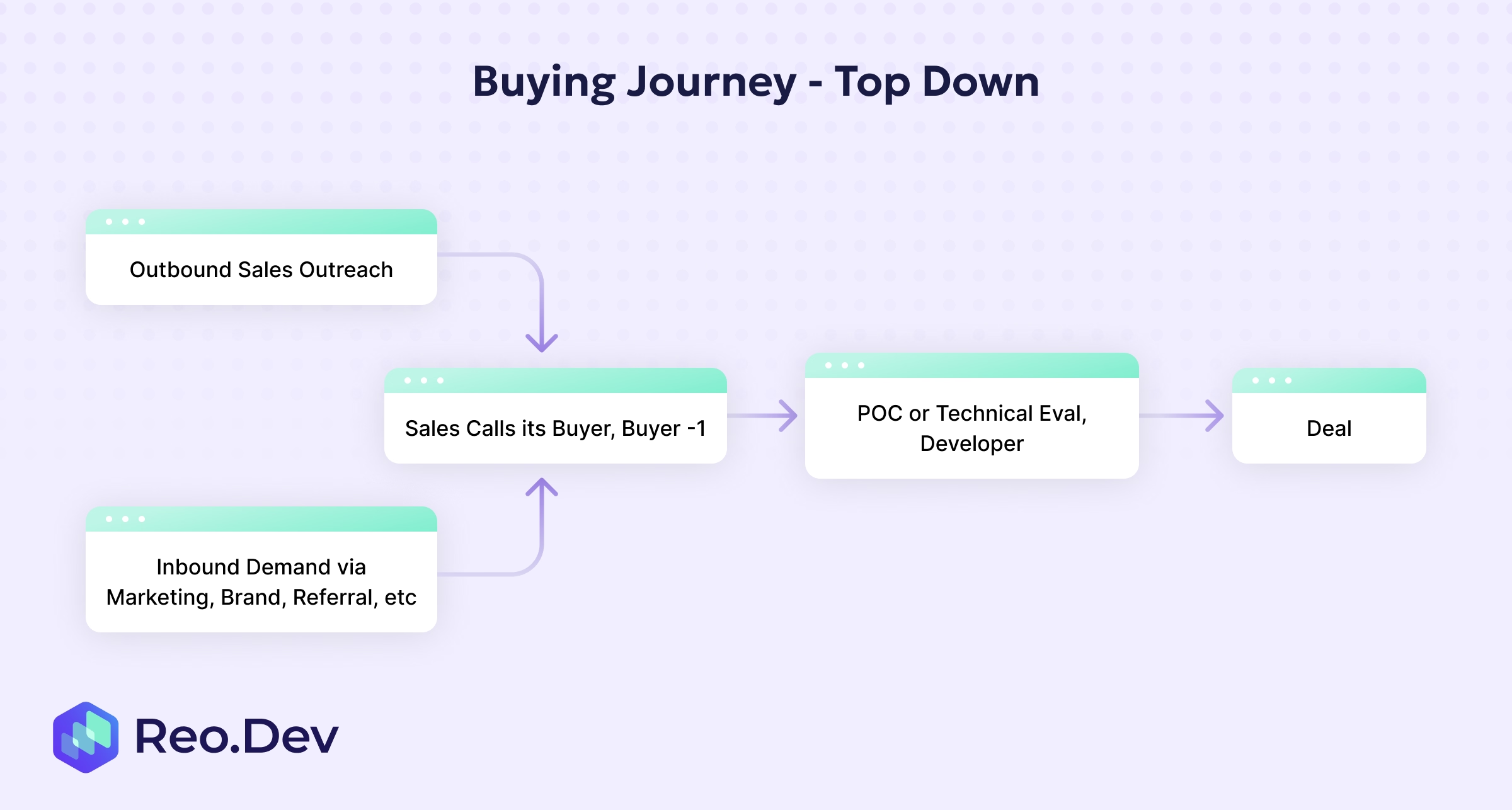
For the top-down approach, you’ll either reach out to the buyer or someone on the buying committee via outbound channels such as email, LinkedIn, or phone, etc. It’s also possible for the buyer to discover your product through your inbound channels, such as your blog, ads, social, or referrals. If the buyer is interested, they would hop on a demo/discovery call with your sales team. If they feel your product would be a good fit, they might start a technical evaluation process or build out a POC. If that checks their requirements, they’ll sign off on the product, and you can consider it a closed deal.
Hybrid Sales Motions
For hybrid sales motions, you’ll see that the process starts with an organizational need (like improving security), which is communicated to the end users who’ll look for a solution to that need. As part of the developer-led evaluation phase, they might try out 2-3 products, check out their features, docs, tutorials, and spin up lightweight POCs to compare capabilities. Once the developer has qualified a list of contenders, they’ll pass on the information to their VP or CEO, which indicates that the buyer evaluation process is now underway.
The buyer will usually pose questions around support, security, and total cost of ownership to their developers. The developers would then engage in deeper testing or documentation review and present their findings to the buyer. Finally, based on the developer’s recommendations, the buyer would choose a tool, which is when a sales conversation can come into the picture to discuss pricing, trials with extended feature checks, and compliance requirements. If this goes well, the deal is closed, and the tool gets adopted across the organization.
A large part of the journey takes place silently in your docs, sandboxes, or demos. It’s crucial for sales teams to track the developer evaluation and building phases cause that’s when you can start showing up with the right message to make sure your tool makes the final cut.
Prospecting and Lead Generation for B2D Sales
For B2D sales, these are the common intent signals that you should be tracking to inform your prospecting:
- Technical content engagement signals: Developers also tend to learn about your product in the evaluation and building phases from your technical content resources like documentation pages, tutorials, API references, and more standard sources like visiting website pages like integrations and pricing.
- Product usage and trial behaviors: This is the most important category of intent signals you should be tracking in this list since they indicate that a practitioner isn’t just interested in your product, but also evaluating or testing it. Common product usage signals include NPM installs, Docker pulls, Localhost builds, CLI activity, open-source telemetry signals like feature usage in your OSS projects, and on-prem or air-gapped deployments.
- Community participation indicators: These refer to developer interactions in public and owned communities such as GitHub, Dev.to, Slack, Discord, Reddit, Stack Overflow, and Hacker News. These community participation interactions include mentions in comparison threads, questions about your tool, discussion of use cases related to the product category, comments on known issues, and integrations. These are crucial intent signals for identifying early-stage interest, especially in bottom-up or community-led GTM motions.
- Hiring and organizational change signals: If an organization is hiring talent with relevant skills, say ones that signal dev/infra maturity like the Head of Security, Platform, or DevOps, you know that they are either scaling up the function or formalizing it, which makes it great for outbound timing.
Based on the developer user/buyer journey we have described so far, here’s what it looks like:
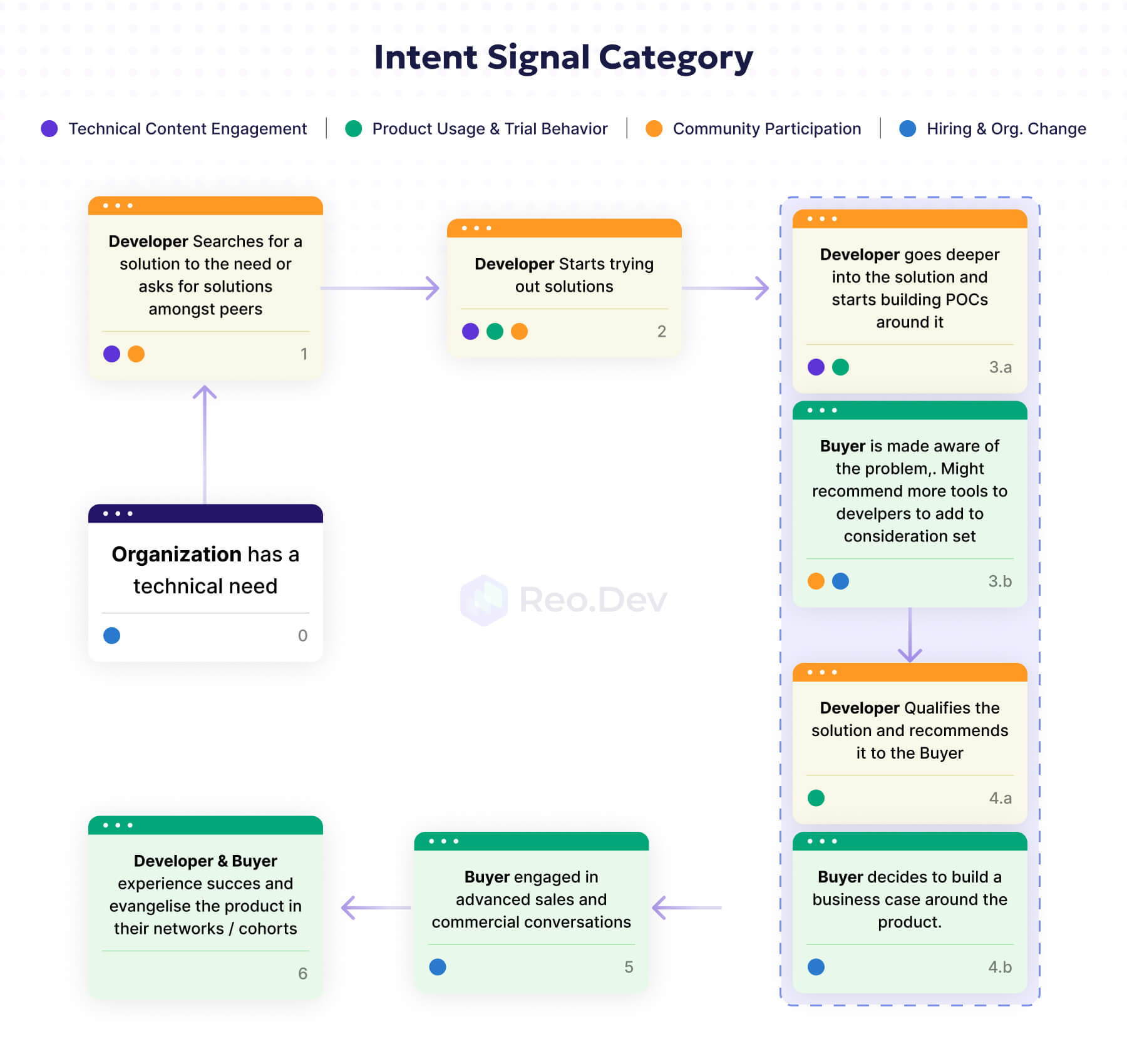
Now that we have the intent signals that you should be tracking for effective outreach, let’s map them to the developer journey.
Outreach Strategies for Technical Audiences
Now that we have mapped the key intent signals to where they might appear in the developer journey, here’s how you can tailor your outreach:
Technical Content Engagement Signals
These are the signals that tell you that developers are educating themselves, but haven’t really committed to evaluating your product just yet. They’re still trying to figure out if your product is a good fit for them and comparing you to alternatives.
At this stage, your outreach strategy should be to simply help them decide without pitching your product. Common scenarios you might face at this stage:
- Developers are deep in your docs or tutorials: You can send additional resources to help them decide fit faster, like integration guides or offer clarification on specific sections of the docs (if you see them coming back to them over and over again). Here’s a message template you can use:
- “I noticed a lot of teams evaluating [category] get stuck trying to integrate X with Y. Here are the relevant doc pages and integration guides if you do get stuck.”
- Developers are checking out your advanced guides, pricing, and troubleshooting docs: This might be the actions they take right before they build out a POC, so your job here is to answer any architecture questions that they might have or share a case study of a similar company. Here’s a sample message template you can use:
- “If you’re looking for different ways to set up custom auth flows, happy to share a couple of case studies/ tips from our customers to help you get started.”
Product Usage and Trial Behaviors
At this stage, the developer is actively evaluating your product, which means your sole job in this stage is to help them successfully complete the POC and avoid disqualification due to friction. Common scenarios you might face at this stage:
- Active accounts on your and competitor GitHub repositories: You can offer assistance by providing them with the best practices, sharing relevant code samples, or proactively helping them unblock common errors. For instance, Kubegrade identified high-intent Kubernetes practitioners across complementary and competitor repositories and reached out to them on LinkedIn, following up with them over email, helping them land 5 demos.
- Multi-developer activity on repositories or product’s code commands: This might be a good time to walk them through a multi-environment setup, or bring up team-level onboarding with buyers, similar to how KrakenD unified signals across multiple first-party signals to roll out persona-specific outreach sequences where developers were offered free audit sequences and buyers got messages around security, performance, and lower maintenance overhead.
Community Participation Indicators
Developers are discussing the problems they might be facing on public forums, so the best way to talk to them is to speak to the underlying problem that they are trying to solve. Common scenarios you might face at this stage:
- Comparison threads: The best way to get the ball rolling is by sharing frameworks, checklists, or public benchmarks, in case you have them. Don’t force your product into the discussion if they haven’t brought it up. If they have, you can point them to internal competitor comparison resources that they might find handy.
- Implementation questions around your product: Point them in the right direction by sharing links to relevant docs, case studies, or videos.
- Dev managers evaluating product category: For this scenario, you can share how other organizations tend to structure a lightweight POC and the team-level ROI they can expect.
Hiring and Organization Change Signals
The best use of these signals is to cold-start your outbound sequences, since they tell you that organizations are getting serious about a specific category. A common scenario you might face at this stage:
- Cloud migration/ hiring head of platform: If they are hiring a platform lead, infra tools can enter the conversation with an ROI, velocity, or compliance lens to put the product top of mind.
The common channels that you can use to carry out your outreach campaigns are:
- LinkedIn: This tends to be the best place to hit up your non-practitioner roles, such as platform leads and engineering managers. The perfect time to strike up a conversation with these stakeholders is when you start noticing multiple developers in your product ecosystem, since that is when the buyer evaluation process is about to start. You can use this channel to share relevant case studies, ROI calculators, or videos to help them answer the common queries economic buyers might have.
- Email: There are multiple ways to use email for your outreach sequences. You can first get in touch with economic buyers on LinkedIn and bring the conversation to email to keep nurturing them, or build a business case with them. You can also use this channel to assist developers who are getting blocked while building POCs, or to introduce them to sales engineers for more complex queries or troubleshooting.
- Community platforms: You’ll find these channels perfect for influencing early-stage buyers by answering product-related queries. These aren’t really that suitable for direct outreach or follow-ups. Most of your end-users tend to hang out here.
Lead Qualification Framework
For lead qualification, these are some of the most common frameworks used:
- CHAMP: Challenges, Authority, Money, Prioritization
- BANT: Budget, Authority, Need, Timeline
- ANUM: Authority, Need, Urgency, Money
- MEDDPPICC: Metrics, Economic Buyer, Decision Criteria, Decision Process, Paper Process, Identify Pain, Champion, and Competition
While these might be good for B2B sales, for B2D sales, we need a custom lead qualification framework to account for developer behavior and multiple fragmented stakeholders by combining elements from the pre-existing frameworks.
We’ll call this framework DEVQUAL + B. It stands for:
- D- Developer Pain & Need: The timing of finding real developer pain makes the difference between a “nice-to-have” and “must-fix-now”. The latter means the developer evaluation phase might be right around the corner.
- E- Engineering Fit & Integration Risk: If your product doesn’t fit within the developer’s stack, your deal either dies or gets stuck in limbo.
- V- Value Champion & Adoption Signals: Developers adopt tools, and adoption drives buying. Your deal won’t go anywhere if your product’s experience isn’t being championed internally by the relevant influencers.
- Q- Quantified Business ROI: Economic buyers are looking for value in the tool beyond improved developer productivity. They are most interested in the cost and risk.
- U- Unblockers: Governance, Security, Compliance: A significant portion of enterprise deals are lost if governance needs aren’t met. By qualifying this, you make sure you don’t become another statistic on that list.
- A- Adoption Timeline / Velocity Triggers: Deals tend to move a lot quicker when a big migration is underway, or an incident has exposed tooling gaps, or the leadership is demanding more efficiency.
- L- Long-Term Success Metrics: By tying your tool to measurable KPIs, you allow developers to accurately evaluate your product more easily, making it easier for platform teams to sign off on standardization.
- B- Build vs Buy Dynamics (add-on): The biggest competitor to devtool sales is usually a homegrown tool. If you fail to qualify this early, you might see the lead vanish after building a POC or lose the deal to internal tooling switching costs. Having this information allows you to accurately position your tool against a homegrown setup based on maintenance overhead, total cost of ownership, long-term sustainability, scalability, and overall performance.
For each component, here’s a list of qualifying questions you should ask.
Developer Pain & Need
- What specific problem is the developer trying to solve right now?
- Is this tied to an active incident, SLA pressure, or a roadmap item?
- How is the pain being solved today? (DIY scripts, legacy tools, manual workflows)
- Who feels this pain most: ICs, leads, platform, SREs?
Engineering Fit & Integration Risk
- Does your tool fit into their existing languages, runtime, cloud, and architecture?
- Does it work with the tools they already use (GitHub, Kubernetes, Terraform, etc.)?
- Will it introduce operational toil or reduce it?
- Is there sensitivity around vendor lock-in?
Value Champion & Adoption Signals
- Who is actually driving the evaluation?
- Has someone already built a small POC or integration?
- Are developers sharing samples internally?
- Has a Slack thread or Notion doc emerged around your tool?
Quantified Business ROI
- Can you tie the developer pain to a business metric?
- Does your tool reduce cloud cost, cycle time, MTTR, or developer hours?
- Can we quantify the impact of not adopting the solution?
Unblockers: Governance, Security, Compliance
- Will the deal require SOC2, ISO, HIPAA, FedRAMP, or DPAs?
- Does their procurement process require vendor risk reviews?
- Are there critical blockers like SSO, RBAC, data residency, or platform restrictions?
- Who owns security risk? (CISO, SecEng, IT, Compliance)
Adoption Timeline/Velocity Triggers
- Is there a deadline tied to a migration, incident, OKR, or release?
- Are they expanding teams or consolidating platforms?
- Is something painful happening right now?
- Is there a natural moment for rollout? (Q1 planning, Q3 migrations, etc.)
Long-Term Success Metrics
- What does success look like for ICs? For managers? For VPs?
- How will engineering measure improvement?
- Do they have existing metrics (DORA, MTTR, build times, cloud cost)?
- How do they track team productivity?
Build vs Buy Dynamics
- Is the team already building an internal version or considering one?
- Do they believe they could build 80% of your features quickly?
- Is maintaining an internal tool someone’s political asset?
- Does internal ownership provide career points for a lead/architect?
- How much maintenance burden exists today?
B2D Sales Conversations and Discovery
You’ve finally managed to score a discovery call with the right lead. To make the most of this call, you need to use it to understand your user’s needs and pain points, build credibility and trust, and qualify the opportunity. This will also help you prepare a tailored, customer-centric solution for the prospect, increasing the likelihood that your team will close the deal later.
Here’s how GitLab structures its discovery calls:
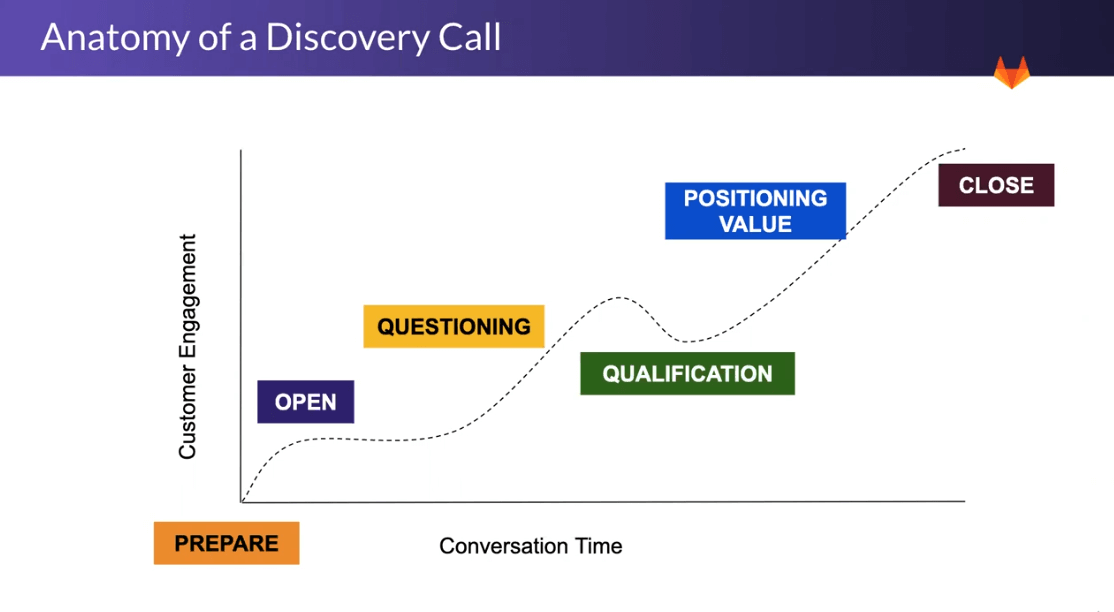
In terms of the questioning phase, you can split your questions into the following categories: goals, needs, and decisions.
- Goals: When your discovery call starts, the first thing you need to identify is the company’s short-term and long-term goals through questions like:
- What are you trying to achieve, and why are these goals important?
- What are the key objectives for the next 6-12 months?
- What has prevented the move so far?
- What are the implications if these problems were to persist?
- Looking ahead, what other challenges or obstacles do you anticipate? What are you doing today to prepare for those challenges?
- What else is holding you back from being more successful?
- What initiatives are currently being planned or under consideration?
- Where is the initiative coming from, and what is the scope? (Team-wide/company-wide initiatives would have a higher ACV)
- Needs: Next, you need to understand the problems that spurred the developers to start looking for a solution. The severity of the problem, coupled with whether or not they’ve already tried solving it in-house or with a competitor, is a valuable insight to help you qualify where the developers might be in the journey (Are they problem-aware or are they solution-aware?). You can ask the following questions to figure out the customer’s pain points and current setup:
- What concerns you the most about your current problem?
- What are the underlying root causes for the issues you and your team are facing?
- What can you tell me about how you currently solve the problem?
- What led you to look at our product?
- What does your existing tool stack look like?
- If you could change anything about your current setup, what would it be and why?
- Are there any competitors you have evaluated in the space?
- What elements are presenting the biggest challenges today?
- Decisions: Finally, get an idea about the decision-making process regarding a developer product in the prospect’s company. This includes asking questions about the budget, timeline, and expected time-to-value:
- How many people/teams are usually involved in the decision-making process?
- What level of executive or senior-level sponsorship is required?
- What is the most important criterion used to make the decision?
- When are you looking to implement? What events are driving that timeline, and is there any flexibility there?
- What budget and resources have been allocated to the project?
- What are the most important things that need to be done to declare the rollout a success? What does success look like? How will it be measured?
- Can you describe possible opportunities for us to accelerate your time-to-value?
Demonstrating Value to Technical Audiences
While the economic buyers would be most focused on the cost-to-value ratio of your product, to get the technical decision makers and end users on board, you can provide:
- Hands-on product demos: Developer adoption is reliant on your product working in their environment. So, your product demo should show your product’s architecture, how your tool plugs into a real system, your APIs/SDKs, the first “Hello World” in minutes, logs/metrics generated, failures/recovery behavior, and performance characteristics such as latency and throughput. Next, to expand on this demo, you can share the following assets:
- Integration fit checklist: Create a matrix to show how your product might fit into their tech stack.
- Failure mode explanation: Give senior engineers your product’s error codes, timeout behavior, retry patterns, and rate limiting behavior.
- Performance benchmarks: Developers don’t like puffed-up vendor claims. Share latency, load test results, cache hit ratios, scaling graphs, etc.
- Lifecycle and maintenance burden explanation: By providing clarity on rollouts, versioning, migration paths, release cadences, and config changes, you ensure your product adds minimal operational overhead.
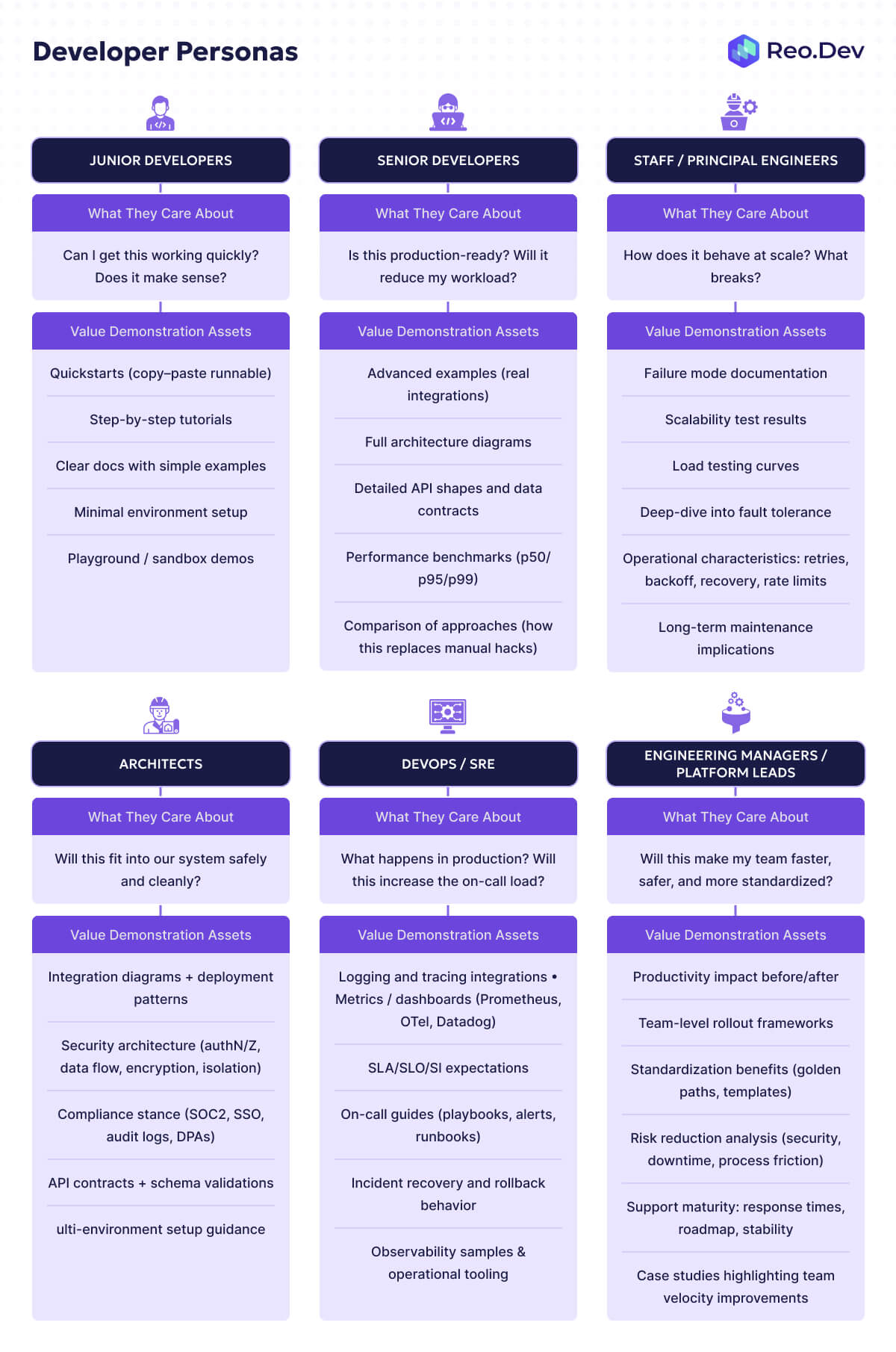
We’ve already discussed how different developer personas tend to have different requirements, pain points, and needs. This means your assets will also change based on the developer persona you are catering to at the moment. You can use the following table to properly segment your value demonstration assets:
A visual representaion of the same:
Closing B2D Deals
You have demonstrated the value to the key decision makers, but in order to close the deal, you would still need to put the common concerns of the economic buyers at ease. With the vast majority of companies facing budget cuts, it’s obvious for your prospect to ask more questions:
- Will this help reduce the cost of running my business?
- If not, will it help me run a more efficient business with lower headcount?
- If not that either, will it help my business meet its key goals?
- What are the implementation costs?
- What are the people-time requirements?
- How will this vendor’s pricing plan scale on a year-to-year basis? Need a detailed analysis on how pricing works for planned usage.
In the next section, we’ll go over how you can help tackle some of the most common questions/obstacles in the list, allowing you to finally close the deal.
Overcoming Common B2D Sales Obstacles
Build vs Buy Objections
The common advice at this point would be to share your build vs buy blog/resource and ROI calculators, but more often than not, it doesn’t get the job done. Most build vs buy guides tend to be a sales pitch in disguise, which turns your audience off. Your resource needs to present a balanced analysis between the two options, because, as we have been saying over and over again, developers love building tools. From a developer’s perspective, software engineering is about building solutions to complex problems. Buying a tool tends to take away the ‘fun of figuring out’ for developers. You can’t just dunk on the ‘build’ option cause it won’t go down well with the developers.
What many companies don’t realize is that the decision to build an in-house tool isn’t just about money either. Non-financial factors such as placing higher value on control over key systems, aversion to additional risk dependencies, and upskilling opportunities are often ignored in these “build vs buy” assets.
So, the best way to make sure this guide actually gets read is by sharing architectural insights, implementation challenges, and solution patterns. When you include the real code for the “tough” parts of the build path and move beyond the marketing talking points, you end up gaining the trust of the developers.
Additionally, you can’t showcase the “buy” path as the perfect option, even if you are pitching your product to them. For instance, if the functionality represents a competitive advantage (proprietary algorithms, novel user experiences, unique data processing methods) or their needs diverge significantly from standard market solutions (these need to be actual, unique requirements, not just preferences), they absolutely should build a homegrown solution. If you’re transparent with them upfront, you turn potential deal-breakers into known challenges that they can manage.
Here’s a handy framework to help you frame ROI for technical decision-makers:
According to Aakash Gupta, most teams also tend to underestimate the true cost of building a solution.

As mentioned in the diagram, costs can quickly balloon into massive bills. To ensure your prospects don’t end up burning a hole in their pockets, beyond the initial development time, you should also mention how long the other actions will take. Additionally, include the risk of delays/overruns, and the opportunity cost of their engineers not working on core features, to give them an idea about the actual cost of building an in-house tool.
LaunchDarkly is a tool that does the perfect job here. They have a three-part series that covers how developers can build their own solution, questions they should ask to determine if they’ve outgrown their in-house solution, and finally, how they can migrate to LaunchDarkly.
Budget Constraints
With slashed budgets in hand, the economic buyers are forced to “do more with less”. To help them do exactly that, Anna Debenham shared a bunch of resources that you can use:
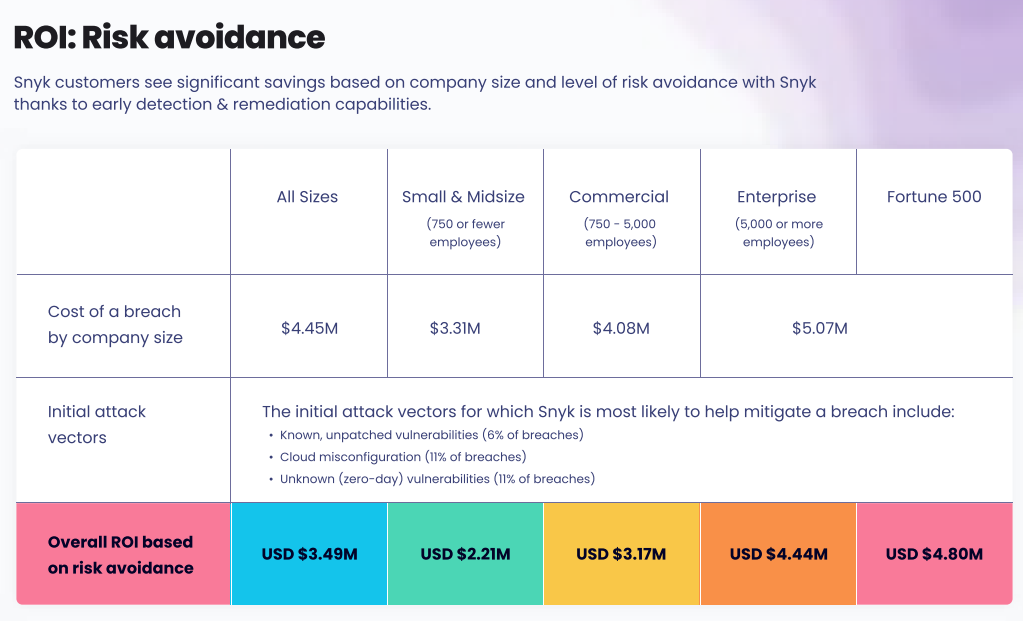
- Quantifiable efficiency gain charts: Snyk identified the top considerations for the C-suite when buying security tooling as risk reduction, compliance, automation, and developer productivity, to name a few. They turned these considerations into concrete numbers, quantifying exactly how much time, money, and headcount they can save customers based on their company size.
- Value demonstration assets: If your tool is cheaper than the incumbent while providing a comparable feature set, you can sell the value of being able to replace the more expensive tool. If you’re more expensive, you can sell the value of removing the need to use multiple tools that might do similar things.
- Cost savings reports: Infrastructure costs tend to take a major chunk of the total budget, so if you can give a clear indication of how much money your prospects could save based on their cloud provider and the number of API calls they make, do it. This especially extends to any and all segments that might be directly related to profit. For instance, downtime for e-commerce companies is a good example where a product that reduces their downtime will be worth its weight in gold.
Navigating the Internal Sale
After your product has gotten the green light from the developer, they’ll need to sell the platform internally. And as the list of questions mentioned before indicates, they might not be equipped to answer all of them. If the economic buyer doesn’t see the value, all your work so far would have been for vain, so it is your job to empower them to package the right resources to enable the internal sale. According to Gonto and Matteo Tittarelli, here’s a list of resources you should include in your purchase approval package:
- Use case and solution pages: These are your additional social proof markers, indicating that your product matches the needs of companies similar to theirs.
- Enterprise-ready features: If your product targets enterprise customers, you should list out all the features relevant to them in your package (audit logs, SLAs, RVAC, etc). Include links to detailed docs/pricing pages in case the buyer wants to check out the details.
- Cost-to-value calculations: This is the most crucial component in this list. Based on the previous sections, you should include your build vs buy summary, ROI calculators, quantifiable efficiency gains, and how your product might replace or remove budget line items.
- Email templates: The internal champion can use these personalized templates to start the conversation about the sale, reducing the friction for them even further.
Navigating Legal and Procurement Friction
You might have won developer love, but if your product doesn’t pass the governance and compliance requirements, you won’t see team-wide or organization-wide adoption. To prevent the deal from getting buried under the weight of SOC2/SSO requirements, DPA terms, liability caps, and multi-environment SLAs, you need to come up with a negotiation strategy. The negotiation strategy will allow you to de-risk unpredictability, offer ramps, structure paid pilots, and justify multi-year commitments while bringing everyone on the same page.
Even if you are a startup, it makes you appear enterprise-ready, allowing larger accounts to feel safer choosing you. Here are the key contract negotiation levers that every developer tool should be familiar with:
7 Key Contract Negotiation Levers for DevTools
Post-Sale Success and Expansion
The post-sales process for developer tools focuses on removing friction for end-users and making the champions look good. If you can do these two things well, the expansion probability goes up significantly.
First, you need to nail the developer onboarding. To make sure your developers don’t struggle with your product, provide them with all the relevant quickstart guides, templates, demo repos, clear escalation paths for technical blockers, and possible dedicated support personnel who would answer their queries in a jiffy.
Next, to build up your internal champion, give them relevant migration guides, internal pitch decks, success metrics their team is seeing right now, ROI snippets they can relay to their boss, and key performance wins, all of which will help strengthen your case for expansion and cross-selling opportunities.
So now that one team within the organization has started seeing success with your tool, you might see another team showing interest. Next, the platform team adopts and standardizes it, which allows the whole organization to start using it. There are 3 main types of expansion possibilities:
- Seat expansion: More developers start using the tool.
- Usage expansion: Teams increase the volume of usage (API calls, logs, deployment pipelines, etc.)
- Cross-team expansion: You provide more licenses for the software so it can be installed or used more broadly in the customer’s organization.
Expansion’s close-cousin upselling comes into the picture when your users upgrade to a higher pricing tier, or in the case of a company with multiple complementary products like HashiCorp, they might adopt other tools in the suite too.
B2D Sales Tools and Technology Stack
CRM and Sales Platforms
Intent data is usually centralized in CRMs to give you a unified view of each account, including product usage, community activity, firmographic and technographic details, and past engagement. This might require a set of rich integrations to ensure all relevant signals are pulled into a single place. CRMs also tend to provide lead scoring abilities to help you prioritize accounts based on ICP fit, activity on first-party assets, and engagement recency and frequency.
According to Zapier, you can give Pipedrive a shot for its ease of use or HubSpot for a versatile offering. If extensibility is a key requirement, Salesforce Sales Cloud might be more your speed.
Sales Enablement Tools
Sales enablement tools help you equip your buyers with the content, tools, and insights they need to close more deals.
Specifically for B2D sales, as the process dictates, your buyers tend to need highly technical content fairly regularly during the building and evaluation phases. Your economic buyers might need shared deal rooms, compliance documentation, audit trails, and legal assets. These are the tools that help you manage and deliver this content systematically to all the relevant stakeholders. Coupled with a CRM, you can keep a close eye on what assets are being viewed and where your prospects are in their journey.
You can also use these tools to build internal training modules for sales reps that can teach how the product works, what common objections look like, how to demo, and how to navigate technical conversations.
Seismic, Dock, and HighSpot are a few highly regarded sales enablement tools you can try.
Measurement and Analytics Tools
Finally, we have the tools you need to use to measure the impact of all your efforts. However, for B2D sales, you need to measure more than just the sales pipeline. Technical adoption, forecasting, and value-delivery metrics also need to be part of your analytics tool stack. Here’s what that can look like:
- Sales pipeline analysis+technical engagement metrics: Measures qualified developer leads, POC conversion rate, number of internal champions per deal, trial-to-paid conversion, expansion rate, time from first dev contact to POC to closed deal, etc. Since this tends to sit at the intersection of product and sales, you can use a tool like Reo.dev to keep track of your complete customer journey analyzing activity across first-party and third-party assets, along with a CRM and revenue analytics tool (Clari, Baremetrics) to get a complete view of which channels produce high-value customers, what usage patterns predict expansion and trigger churn, etc.
- Customer success/health-scoring: Monitors account health and sends alerts when usage drops, allowing you to manage renewals/expansions through tools like Gainsight and ChurnZero.
- ROI measurement frameworks: Measuring how your product reduces toil, saves costs, improves developer velocity, and improves overall performance can be handy when pitching your product to economic buyers. To correlate usage, cost, and key outcomes, you can use a business intelligence tool (Metabase, Tableau) with a data warehouse setup (Snowflake, ClickHouse) that combines data from other analytics, CRM, and billing tools.
Team Structure and Hiring for B2D Sales
Usually, your sales team will have the following people:
- Technical SDRs: A technical SDR or BDR manages inbound from hand-raisers and mines DQAs (Developer Qualified Accounts) for outbound sequences.
- Account Executives (AEs): An account executive might receive DQAs from technical SDRs/BDRs to help them navigate their self-serve journey to becoming a DQO (Developer Qualified Opportunity) and, ultimately, turning them into paid customers. In some organizations, they might be responsible for identifying new use cases and seat expansion up to a certain threshold before the customer success team takes over.
- Solution Engineers: The solution engineers are responsible for removing friction to accelerate self-serve signup flows, provide technical deal support to account executives, and enable internal champions.
- Customer Success Technicians: After your deal closes, your customer success team will handle technical onboarding, product adoption, and usage expansion.
Your first hire would depend on your company's goals and stage. So:
- Do you need help converting self-serve users to paid customers? It might be time to hire an AE.
- Do you need help managing inbound and mining DQAs for outbound? Get a technical SDR/BDR on board.
- Do you need help guiding users on their journey to realize value, remove friction points, or deal with more technical obstacles? You would need to bring in solution engineers if your AEs aren’t well-versed in the tool. For post-sales success, customer success will play a crucial role in expanding within your enterprise customers’ organizations.
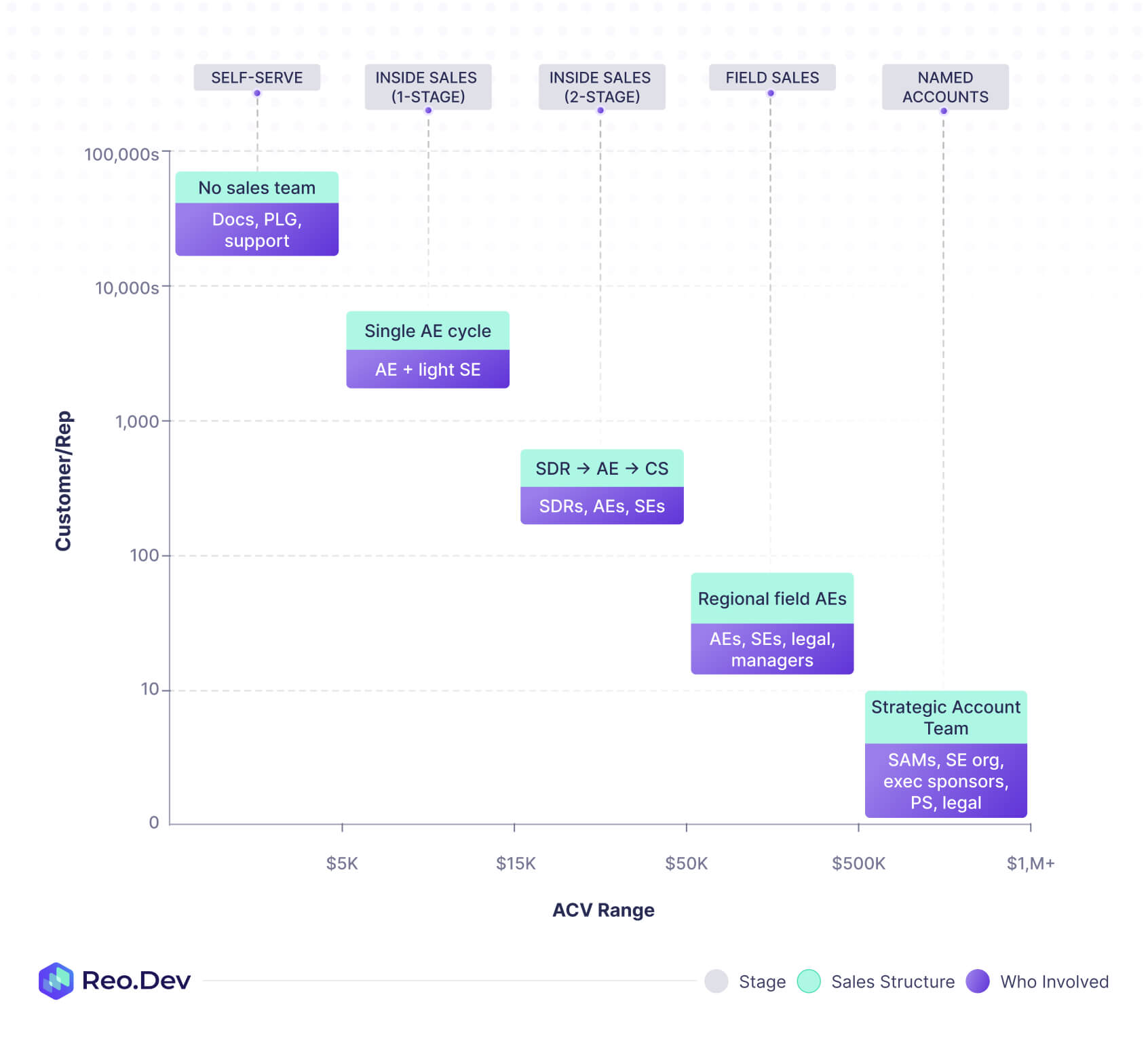
Based on your annual contract value (ACV), your sales motion might evolve as follows:
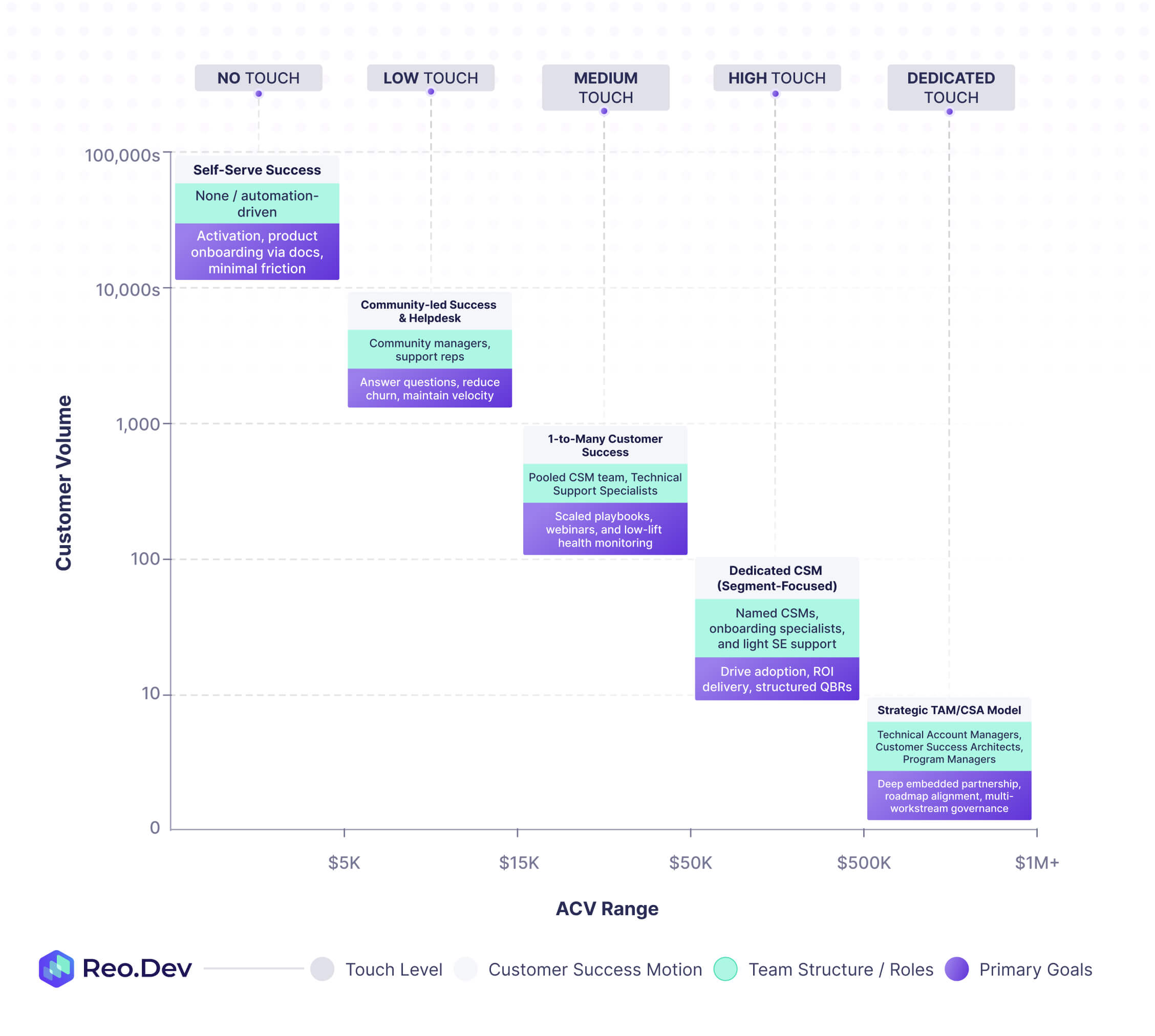
Your customer success team tends to follow a similar pattern:
Hiring Criteria for B2D Sales Roles
Based on the public handbooks and job descriptions for companies like GitLab, Grafana, Snyk, and Vercel, you can use this hiring criteria matrix to assess the key skills and traits for B2D sales roles:
Training and Development Programs
Finally, to help you get your sales reps up to speed, you need to set up training and development programs to equip them with your tool’s capabilities, common objections, industry-specific knowledge, and channel-specific strategies, to name a few.
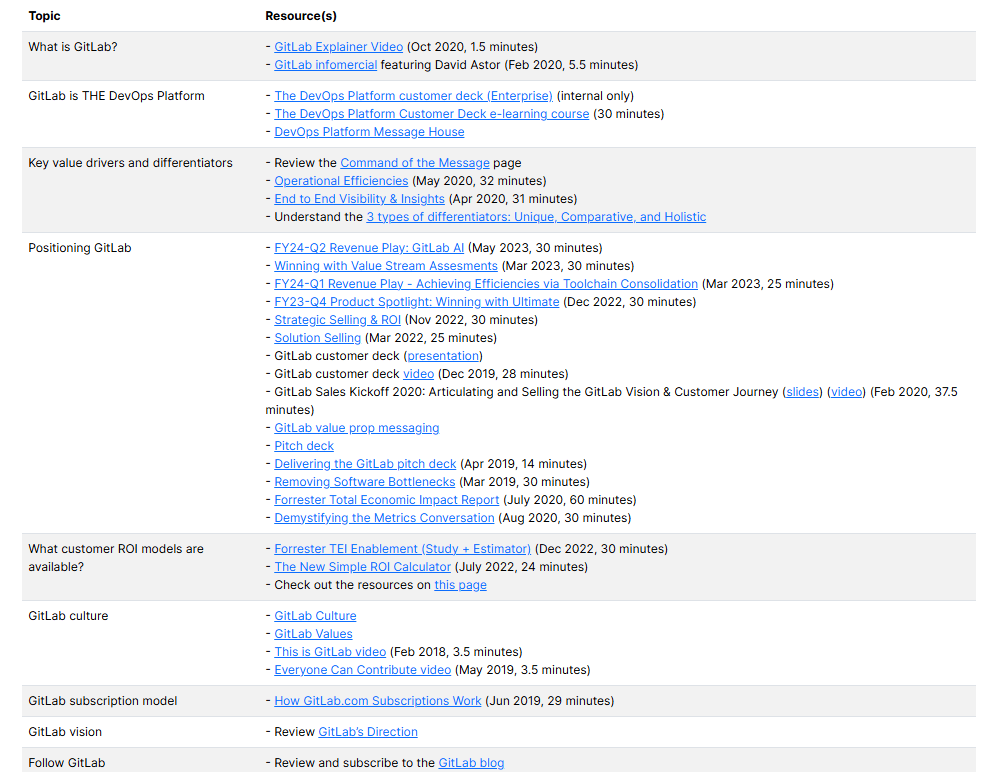
- Product and technology education: You can take a page out of GitLab’s handbook, which collates information on everything a sales rep might need to understand why a customer should pick their tool, the competitive landscape, and how each product in their suite fits a specific persona’s workflow.
- Developer community immersion: One of the best ways to learn a new language is to strike up conversations with the residents of that country/region. Similarly, the best way to get acquainted with the key talking points, pain points, evaluation criteria, and needs of the developers is to immerse yourself in the relevant communities across Slack, Reddit, Hacker News, and Dev.to.
- Technical objection handling: Use a tool to collate common objections across different developer personas and industries, and engage in roleplay sessions to help AEs/solution engineers become accustomed to the key objections they might have to tackle when dealing with prospects or customers.
- Industry-specific knowledge building: There might be different industries that you end up servicing with your product. You can create a dedicated playbook per industry by using the template used by PostHog for their sales teams:
- Description (general overview of what the industry is and the businesses it consists of)
- What they care about (i.e., what is most important to their business success)
- Industry terminology
- Common software used
- Important business metrics and data
- Metrics
- Data (event taxonomy, person profiles, groups)
- Your products they should be using
- Product
- Best practices
- Common challenges
- Cross product use cases
- Product
B2D Sales Metrics and KPIs
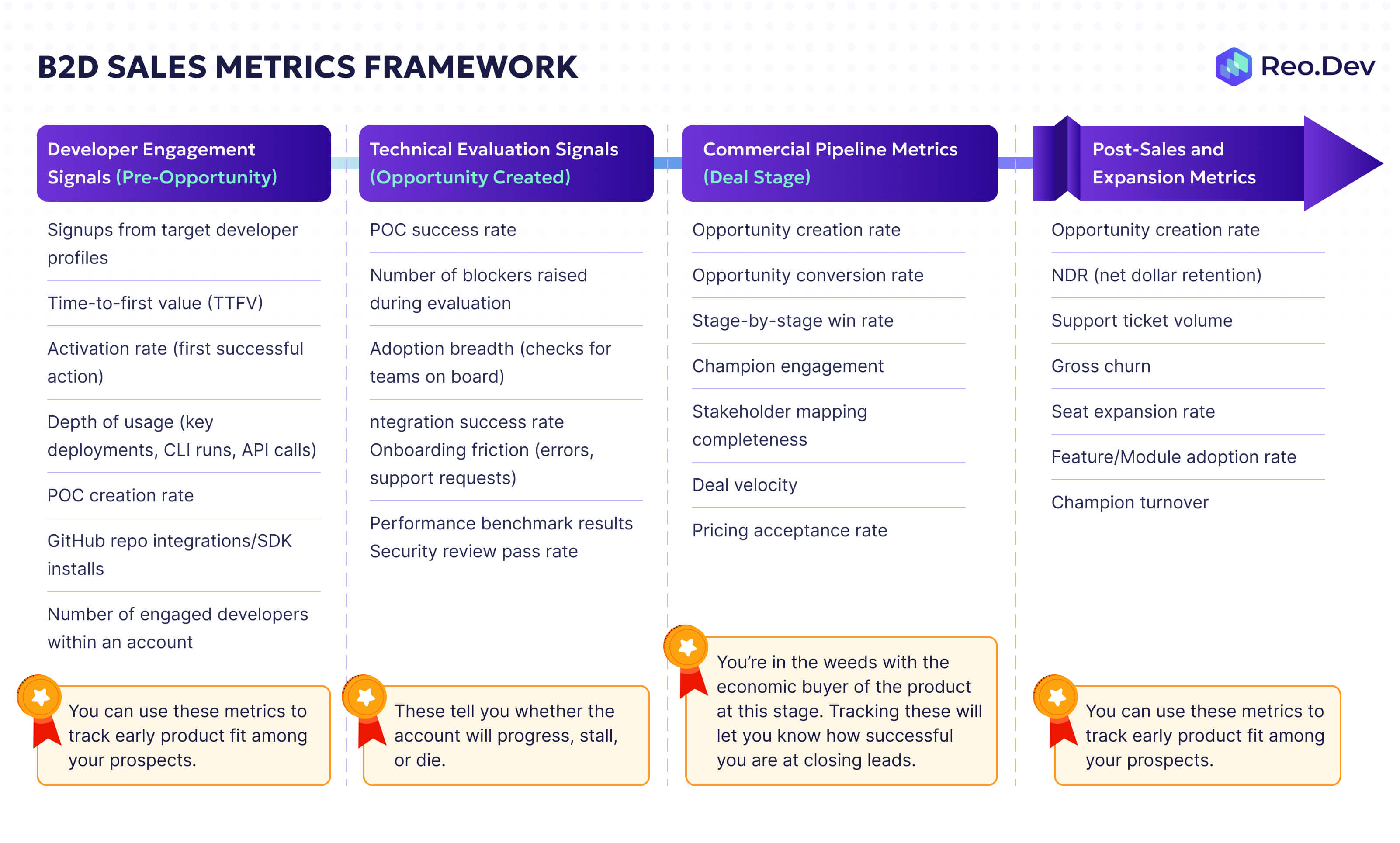
Developer Engagement Signals (Pre-Opportunity)
- Signups from target developer profiles
- Time-to-first value (TTFV)
- Activation rate (first successful action)
- Depth of usage (key deployments, CLI runs, API calls)
- POC creation rate
- GitHub repo integrations/SDK installs
- Number of engaged developers within an account
You can use these metrics to track early product fit among your prospects.
Technical Evaluation Signals (Opportunity Created)
- POC success rate
- Number of blockers raised during evaluation
- Adoption breadth (checks for teams on board)
- Integration success rate
- Onboarding friction (errors, support requests)
- Performance benchmark results
- Security review pass rate
These tell you whether the account will progress, stall, or die.
Commercial Pipeline Metrics (Deal Stage)
- Opportunity creation rate
- Opportunity conversion rate
- Stage-by-stage win rate
- Champion engagement
- Stakeholder mapping completeness
- Deal velocity
- Pricing acceptance rate
You’re in the weeds with the economic buyer of the product at this stage. Tracking these will let you know how successful you are at closing leads.
Post-Sales and Expansion Metrics
- Usage growth vs contract capacity
- NDR (net dollar retention)
- Support ticket volume
- Gross churn
- Seat expansion rate
- Feature/Module adoption rate
- Champion turnover
To align the entire organization around one goal, we’d have to pick a North Star Metric that sits on top of these metrics. The North Star Metric we pick would then become the top-line metric around which all company priorities will revolve. Lenny Rachitsky classified common North Star metrics used by companies into 6 categories: Revenue, Customer Growth (no. of customers paying for your product), Consumption Growth (increased usage of product), Engagement Growth (no. of users increased), Growth Efficiency, and finally User Experience.
For our B2D approach, based on Lenny’s categories, Paid Active Developers (PAD) or Paid Active Teams (PAT), depending on whether your product is individual or team-first, can be a good North Star metric.
PAD/PAT aligns well with the PLG bottoms-up adoption commonly seen for developer tools, is directly correlated with revenue expansion, is influenced by every stage of the buyer journey, and reflects your product’s value.
Common B2D Sales Mistakes and How to Avoid Them
- Assuming buyer = user: While this might be true for startups, in most cases, your end-user and buyer will be different. Both of them have different needs, requirements, priorities, decision-making processes, and goals. Your messaging should be catered to the persona you are dealing with.
- Treating all users as leads/opportunities: You’ll come across all sorts of developers using your product. Some might be forever hobbyists, while others might be fine with just the free version of the product. Even if a developer doesn’t fall into those two categories, that doesn’t mean they're the right fit. Understanding customer fit and context is crucial.
- Using “marketing speak” with developers: Your overarching benefit slide deck won’t help here. Developers want technical clarity. As Keith Casey said, developers pretty much only have two goals in life: build something useful and go home. So your product needs to be a value add in their stack, allowing them to do their job better or faster, or remove some sort of friction in their workflow.
- Ignoring the “build vs buy” discussion: The biggest competition to your developer tool is the willingness of developers to build a solution themselves. You can’t just default to signing praises of your tool and hope they start using it. Show them the scenarios where it makes sense to build an in-house tool and where they should think about an off-the-shelf tool.
- Positioning yourself too broadly: If you position yourself as a tool that helps them “ship more code” or “save valuable developer time”, you’ll turn off your audience. Your positioning should be focused on solving one pain point in one developer workflow for one persona when you’re dealing with the technical bunch. You can rely on the top-level benefits when you get to the economic buyers.
- Pushing for meetings too early: If a developer is just discovering your product, asking them to get on a call with you will usually be met with silence from the other end. You need to watch them evaluate the product on their own from the sidelines, help out as and when needed, and make yourself known when an economic buyer enters the journey.
The Future of B2D Sales
Impact of AI on Developer Tools
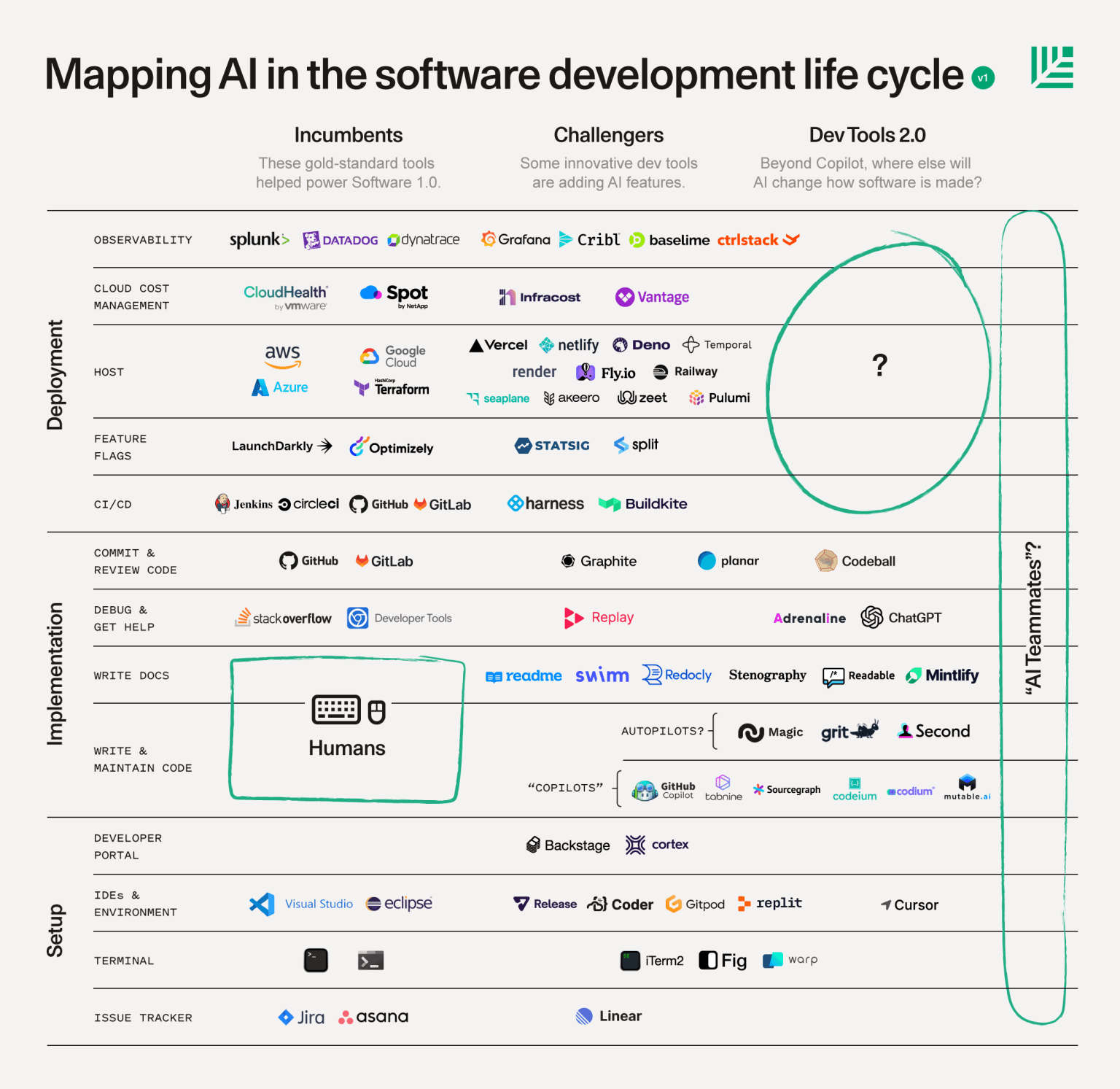
According to Stack Overflow’s 2024 survey, the vast majority of developers were using AI tools to write code, search for answers, and debug. Vibe-coding or coding with AI is quickly becoming a strong competitor to incumbents. Taking a look at the tooling landscape, Sequoia felt this is what the way ahead could look like:
Bessemer Venture Partners then came up with a roadmap that could very well fill the gaps you can see in the previous diagram.
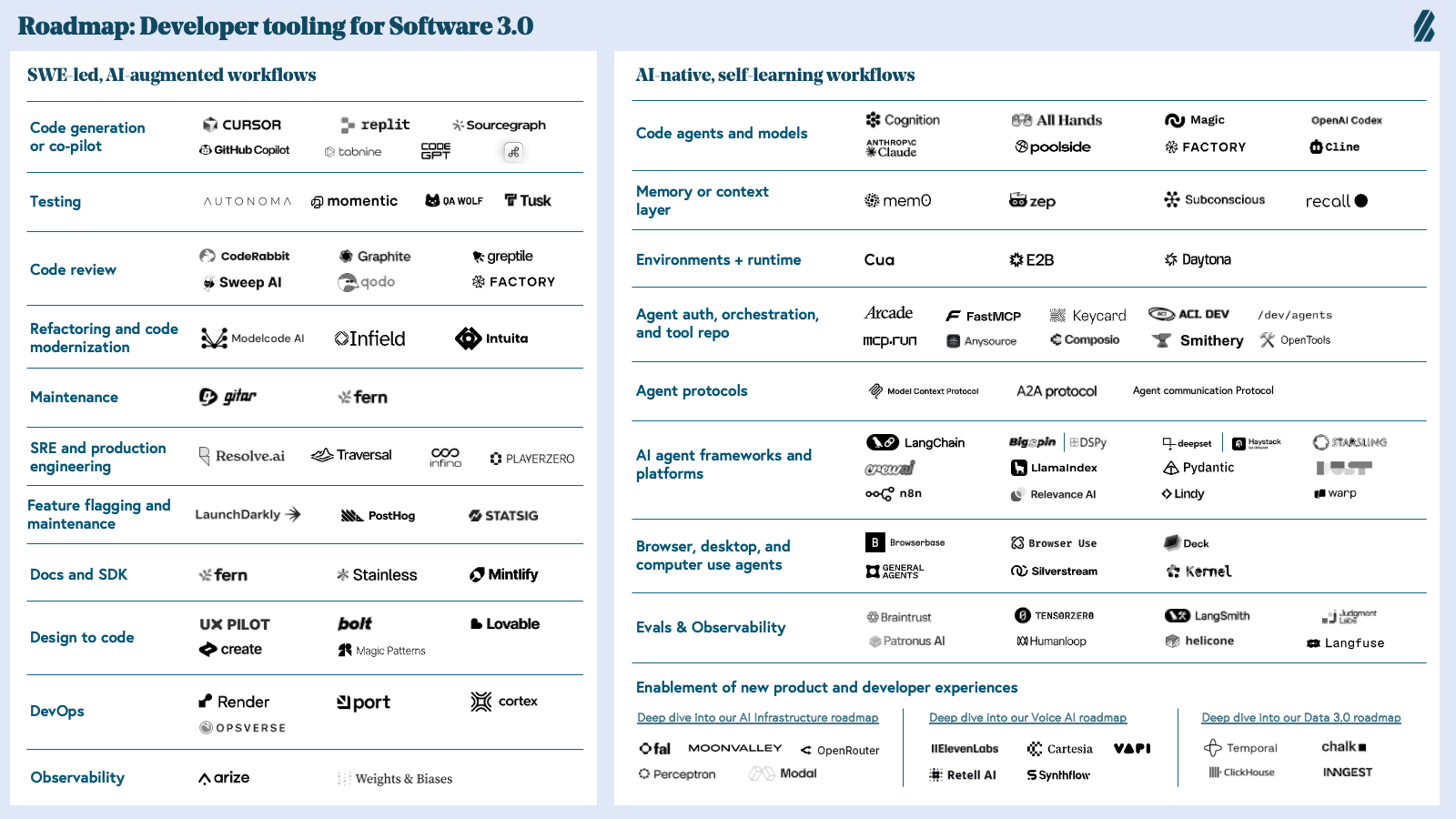
Looking at the diagram, the obvious conclusion is that people might be more inclined than ever to build tools rather than buy them, but that conclusion may be overstated.
Enterprise solutions with their complex business rules and millions of lines of business logic that capture constraints and processes around security, policy, compliance, legal, financing, and pricing might not have to worry about the vibe-coded solutions at this stage. Marty Cagan described this context MOAT best:
“The vast majority of non-technical people who wish to create business apps have little to no idea about these business rules. Even the technical people struggle with these rules because mostly they are embedded in the code as business logic, and the people who defined and implemented these rules have often moved on long ago, and while there might (rarely) be a document describing the business rules, those documents almost never explain the reason and nuance behind each rule.”
While yesterday, software was created to just be used by people, tomorrow, the solutions might also be used by AI agents and new custom solutions built on top of those component solutions. This means the conversation would shift from build-vs-buy to build-and-buy. Companies would continue buying complex and valuable component services for important parts of their business, but these components would be designed to be accessed and controlled by both humans and software that includes custom-built AI agents. This means your usual B2D unblocking and enablement resources would have to be created with two personas in mind: a human and an AI.
Finally, with the rise of more vibe-coding tools, user programming will pick up more steam, which means you’ll see more “citizen developers” who have no coding experience enter the conversation. As these tools keep getting better, for simpler workflows, you’ll see your user and buyer meld together.
AI-assisted or AI-based coding has its fair share of security issues, which means ethical AI, data privacy, and a strong governance policy would be key selling points down the line, so it might be a good time to improve your knowledge on those points.
Impact of AI on Sales Hierarchy and Process Evolution
According to Jeffrey Bussgang, your sales setup might evolve as follows in the age of AI:
- Founder-led sales: During this phase, it’s just going to be the founder. Since they created the product, they’ll be the best salesperson of their product in this phase. AI would serve as a force multiplier, helping you refine pitch language to hit message-market fit quickly. AI could also handle the research for prospect outreach, allowing you to focus on conversations. Take the insights you’ve gained from these AI-augmented interactions to start developing a sales playbook once you’ve built a repeatable motion.
- Hiring first reps: In this phase, you’ll bring on reps who can operate without a complete playbook, using AI as a collaborative learning tool. This might mean A/B testing outreach strategies to accelerate the feedback loop, or identifying patterns across successful deals, or lead scoring that learns from conversion data.
- Hiring a sales coach: Once your initial sales team starts breaking even on costs, you could bring in a sales leader to codify the motion, establish repeatable processes, and prepare for scaling, using AI tools to formalize and optimize the sales motion. They could also start building AI-powered sales enablement systems that evolve based on what’s working.
- Scaling: Once you have a proven sales playbook, clear customer segments, and predictable sales, you can bring on more mainstream roles to support the existing functions or scale it further. At this stage, you might have an ecosystem of specialized AI agents working together:
- Orchestration agents to break down high-level growth goals into workflows and coordinate execution across agents and teams.
- Lead generation agents to decide which leads are worth pursuing and the right channel to approach them. They would search, consolidate, and score leads using signals pulled from first-party and third-party data.
- Qualification agents to decide the opportunities you should engage with at the right time. They would propose solutions in real time, estimate ROI, and map buying groups.
- Deal conversion and pricing agents to craft proposals, communicate pricing based on deal characteristics and pricing guidelines, coordinate legal and finance inputs, and accelerate deal closure.
- Customer success agents to identify churn risks and trigger expansion plays based on real-time usage insights.
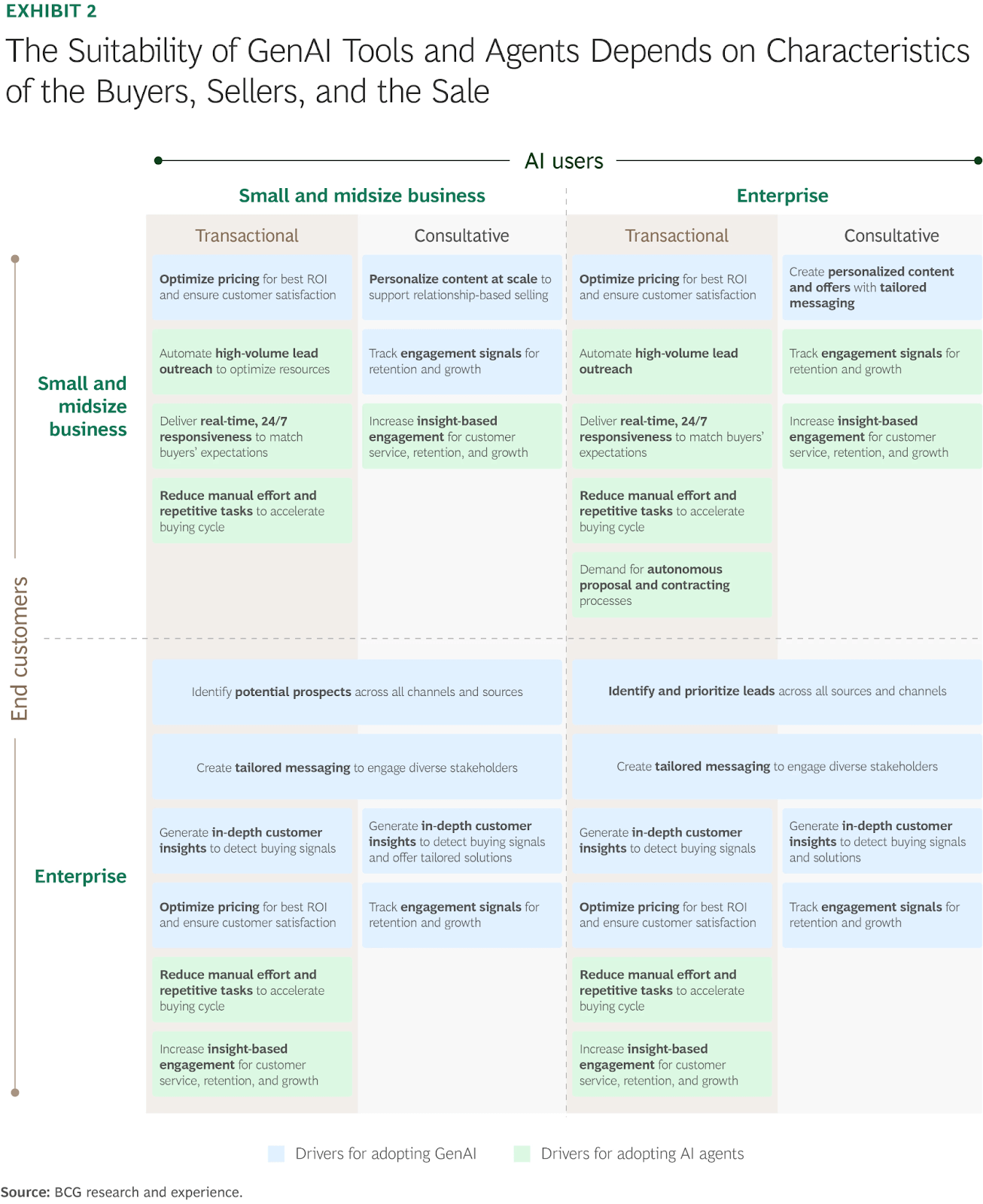
This would be the possible upside of implementing AI in your workflows. But according to Bain’s report, most sales orgs are still struggling to implement AI at scale for the following reasons:
- Implementing it for just one case doesn’t improve the seller’s productivity by a whole lot, because a salesperson’s day tends to be fragmented across a dozen different tasks. Most companies haven’t taken the time to map out the end-to-end salesperson workflow to pinpoint areas that can be improved, so the implementation efforts are still limited in scale.
- Applying AI to existing processes often results in micro-gains because new bottlenecks pop up. Since most companies aren’t focusing on redesigning their processes, they might end up automating inefficiencies instead of removing them.
Companies really want to start implementing AI in their workflows, but in order to do it, they need someone to provide them with the right company context, clean the data, and standardize it across functions to ensure efficiency gains don’t just stay on paper.
You might see the rise of these “sales innovation” roles in the future, and if that is a role that interests you, you can start by pinpointing communication, brainstorming, research, and administration blockers within your organization today. Create a doc, jot them down, and start doing a deep analysis on what it would take to actually automate some of those tasks. Get in touch with relevant stakeholders to understand what the value of automating those tasks would be for them, which would help you get internal buy-in.
You can also start maintaining a shared AI prompt library for your team, where your sales team could share LLM prompts that they found helpful. As the landscape keeps changing, the old ways of doing things might end up going obsolete soon enough, so the best way to future-proof yourself is to get comfortable with experimentation and allow room for your team to do so, too. These actions would go a long way in making you indispensable as a 10x salesperson.
There’s good news for the SDRs/BDRs, too. Sales AI tools have been talking about making outbound more efficient and personalized, but the results haven’t been up to the mark in a lot of scenarios. If you’re using AI to just create another “Hey [X], saw you interact with [Y]’s post” message followed immediately by pitching your product, you’re not going to see value with it.
What you can do instead is use it as a research assistant to find out what their pain points, needs, and context might be. Use that to come up with a thoughtful message that lets the buyer know that they aren’t just another name on a spreadsheet. Having the ability to actually establish rapport with the buyers is where the SDRs and BDRs can truly stand out, taking on more of a buyer assistance role that understands technical friction points instead of just pushing for meetings.
Conclusion
B2D sales is not a new label for developer marketing. It is a complete shift in how technical products are evaluated and purchased. Developers start the journey on their own through docs, repos, tutorials, and small tests. The real decision forms during the learning and building phases, long before a buyer reviews pricing or a sales call happens.
This is why the traditional funnel breaks for DevTools. You do not convert interest through persuasion. You convert proof of value through successful integration. The role of sales in B2D is to support the developer evaluation process, help teams reach value in their POC, and give economic buyers a clear path to act on what developers already trust.
The companies that succeed in B2D work in three layers. Product and content earn adoption. Signals reveal real intent and timing. Sales steps in when a working POC is close to value, not before. Buying decisions in technical products are the result of collaboration between end users who run the tool and buyers who authorize it.
If you want to build a strong B2D motion, start by understanding how developers evaluate new tools. Map your journey by intent signals, not lead stages. Qualify on technical fit and internal champions, not firmographics. Make it easy for a developer to build something meaningful, then help the buyer see the business case created by that work.
In B2D, adoption is the engine and revenue is the output. The playbook in this guide shows how to align your product, content, signals, and sales conversations with the real path developers take. If teams can reach value without friction, if buyers can move fast with confidence, and if internal champions feel supported, your sales model will scale across both users and organizations.
Frequently Asked Questions
What is B2D sales?
B2D sales (Business-to-Developer) is a GTM motion where products are adopted bottom-up by developers before the formal purchase happens. Sales supports the journey by enabling POCs, reducing technical friction, and helping economic buyers make decisions based on proven value.
How is B2D different from B2B sales?
B2B starts with a buyer conversation. B2D starts with product usage by developers. In B2D, the user and buyer are different personas, the journey is anonymous and technical, and sales timing matters more than top-of-funnel outreach.
Why do developers require a different sales approach?
Developers don’t respond to pitch-led outreach. They evaluate tools through docs, code, GitHub, POCs, and technical examples. Sales succeeds by supporting their build process, not pushing demos too early.
When should sales engage in a B2D journey?
The right moment is when a team is building a POC and the buyer becomes aware of the problem. Before that, developers must explore the product on their own through docs, code samples, and trial environments.
Who are the key personas in B2D sales?
There are two primary personas: developers (end users) and economic buyers. Supporting stakeholders include tech leads, architects, security teams, procurement, and cross-functional engineers who influence adoption.
What are the biggest misconceptions about B2D sales?
Common misconceptions include: developers hate sales, free users don’t convert, PLG removes the need for sales, and segmentation should follow SaaS models. In reality, B2D needs custom ICPs, technographic signals, and a hybrid sales motion.
How do developers typically evaluate a DevTool?
The journey usually follows: discover → evaluate → learn → build a POC → scale adoption → advocacy. Developers move from docs and examples to real integration before budget conversations begin.
What intent signals matter most in B2D sales?
High-value signals include code commands, API usage, GitHub activity, NPM installs, Docker pulls, docs engagement, tutorials, pricing page visits, and community discussions around use cases.
How do you qualify a B2D opportunity?
Traditional B2B frameworks fall short. A better model qualifies developer pain, engineering fit, internal champions, business ROI, governance blockers, adoption timeline, long-term success metrics, and build-vs-buy dynamics.
How do you run a discovery call for technical products?
Discovery should uncover goals, pain, and decision process. Questions focus on what the team is trying to achieve, existing workflows, technical gaps, POC expectations, and what success looks like after rollout.
How do you demo DevTools to technical audiences?
Skip feature tours. Show real integrations, architecture diagrams, failure modes, latency benchmarks, logs, on-call behavior, and “Hello World” in minutes. Tailor depth to the persona: junior dev vs architect vs SRE.
How do you handle the build vs buy objection in DevTools?
Acknowledge that developers like building. Compare real engineering effort, maintenance cost, incident load, governance requirements, and opportunity cost. Offer a transparent analysis rather than dismissing the build option.
What slows down B2D deals in enterprise environments?
Governance. Security reviews, SSO, SOC2, DPAs, legal terms, data residency, SLAs, and procurement timelines can stall adoption even when developers love the product. Structuring trials and clear contracts helps move deals forward.
What metrics should B2D sales teams track?
Early signals: activation, docs depth, CLI usage, POC creation.
Opportunity stage: blocker rate, integration success, stakeholder mapping, deal velocity.
Post-sale: usage growth, seat expansion, NDR, and champion engagement.
What does a B2D sales team look like?
Teams evolve with ACV. Early stages rely on PLG and support. As ACV grows, companies add technical SDRs, AEs, solution engineers, and customer success specialists who understand dev workflows and can support POCs end-to-end.


